

Medication Relations
In this section, we explain how structured data for medications relations is represented in the NLP API JSON output and in the Output Database schema. We also provide sample queries to illustrate the key aspects of the data schema.
After reading this page, we hope you will:
- Understand what medication relations are.
- Understand what attributes are extracted.
- Know how to find medications and their attributes.
The content in this section builds on the concepts and data models explained in earlier sections (see Entity-level Tables, and Document-level Tables).
What are Medication Relations?
Patient records often contain information about medications. In addition to the drug name, reports may also note the medication’s dispensing information and patient instructions. When the NLP API encounters a reference to a medication it recognizes, it is able to extract many of the prescription-related details as attributes. In the NLP API, a medication relation comprises of a drug name and its associated information.
Consider the following statement:
From the above, the NLP API extracts a medication relation for the recognized drug name, Percocet as follows:
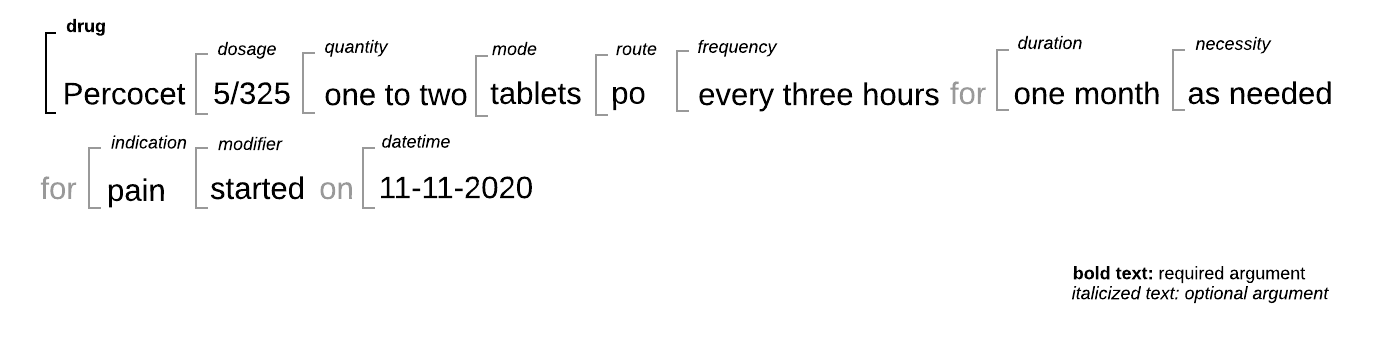
As shown above, the NLP API extracts eight different attributes related to medications. The following describes each attribute and provides some examples of terms that are recognized. Please note that the examples of recognized terms is not exhaustive.
The medication relation attributes extracted by the NLP API are:
- Drug: A substance that has been prescribed to, or taken by the patient. To identify medication relations, the NLP API uses medications defined in the RxNorm and Medcin ontologies. However, because it also performs post-coordination of concepts across ontologies, the equivalent drug concept may also be returned for the SNOMED ontology when it also exists in SNOMED CT.
- Indication: Reason given for prescription.
- Dosage: Size or level of a dose of a particular drug, which can be unitless. Examples of dose information are:
10/100,81 mG,10mL,sliding scale,Twenty (20) units,20 milliequivalents,20mEq,81',1 g,2%,2ml/ml,5 mcg/kg/min. - Route: The path by which the drug is introduced into the body. Examples are:
IV,by mouth,p.o.,subcutaneous,drip,G-tube,Dobhoff Tube,sublingual,topically,sl,intramuscular,buccal,sc,hsq,NG,inhaled. - Quantity: The amount of drug in prescribed dosage to be taken by the patient, often without units and preceding a route. Examples are:
Two (2),1,one to two. - Mode: The form the drug comes in. Examples are:
caps,cream,capsules,gtt,inhaler,MDI,puffs,solution,tablets,sustained release,ointment,suspension. - Frequency: How often the drug is to be taken by the patient. Examples are:
daily,tid,b.i.d.,once daily with meals,twice a day for the next 8 days,q4H,q.24 hours,q. four to six hours. - Necessity: If the drug is required or can be taken if needed. Examples are:
PRN,p.r.n.,as needed,p.r.n. as needed. - Modifier: If the statement also contains a modification to the prescribed regimen, it will be identified as a modifier. Examples are:
discontinued,stopped,taper. - Duration: How long the person is exposed to the drug. For example in the sentence
Lasix 20 mg qd for 5 days., 5 days is extracted as the duration. Duration in this context is not to be confused with “duration of action”, the pharmacokinetics of a drug. - Date_time: This argument extracts any concrete, specific date and/or time expression that may be present. This may be the date prescribed, date started, date stopped, date ordered or the expiration date of a medication. Other examples of sentences where dates are extracted include:
Medication relations are typically used to extract posology information sections of the reports that provide information about patient’s medications or medications administered. You can limit the results returned by filtering on the foundentity table, section_name attribute for a given drug mention.
JSON Data Model
The JSON below shows the NLP API’s JSON result output for a medication relation extracted from this statement:
From the JSON output above, we see that:
- The
medicationsarray is an element of therelationsobject. Each element of this array is a single object representing a medication relation instance. - A medication relation instance has several named arguments: the
drugand the recognized attributes:indication,dosage,frequency,quantity,route,mode,necessity,duration,modifieranddate_time. - Note that the
drugargument is required. Each medication relation corresponds to exactly one drug. - All attributes are arrays of entity references. For example if 2 dates are present, both entities are extracted and returned as an array.
- Other attributes are optional. For example, if the report does not indicate how frequently a medication should be used, the
frequencyattribute is an empty array.
Medication Relation Tables
In the Output Database schema, medication relations are stored in the medicationrelation table. Its attributes are stored in correspondingly-named tables as shown in the following ER diagram.
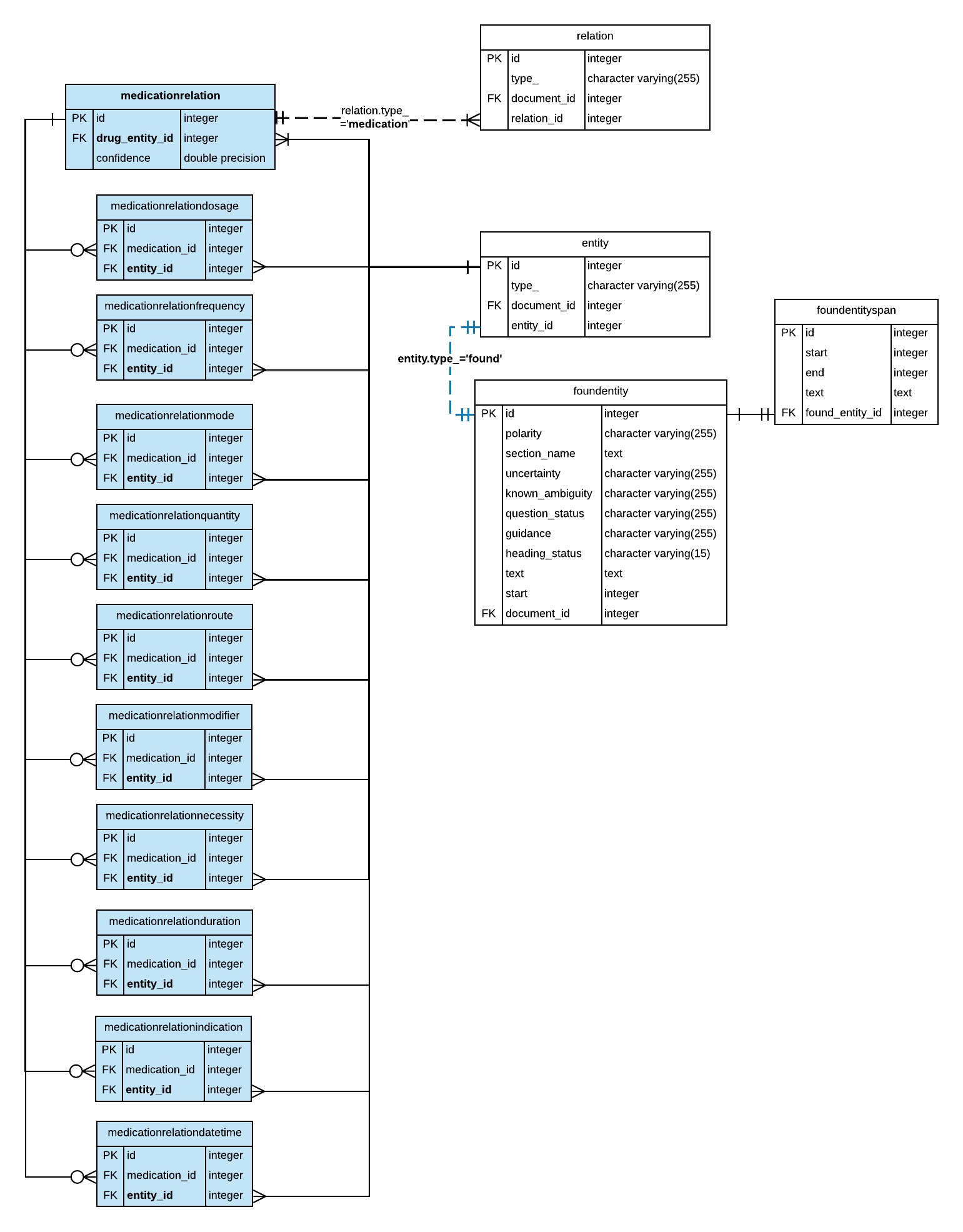
A few key points should be noted about this schema:
- Each medication relation relates to exactly one drug. Each drug mention is represented by an entity in the Output Database schema, and has a corresponding row in the entity and foundentity tables respectively.
- In addition to the entity attributes stored in the foundentity table, such as section_name, many other attributes about an entity can be found from performing SQL joins with entity-related tables. For more information see Entity-level Tables.
- The attributes extracted for medication relations are stored in tables with corresponding names. For example,
dosageis stored in the medicationrelationdosage table andfrequencyis stored in the medicationrelationfrequency table. Information about a medication relation’s attributes can be retrieved by performing an inner join on the primary key column of the medicationrelation table and the medication_id foreign key of the corresponding attribute table. - Notice that a medication relation may have zero or more instances of an attribute. This may be important to remember when you want to write a query that extracts all the extracted attributes. An additional aggregation step will be required to aggregate the terms or concepts for each attribute type.
Sample Queries
Medication relations are stored in a highly normalized way, where each attribute is a separate table, and subsequent joins with entity-related tables is required to retrieve all the information required. Performing a large number of table joins for a large dataset may be impractical for low latency data retrieval use cases. The following sample queries are provided for instructional purposes only and may only be appropriate for initial data exploration and some analytic use cases.
In this section, we present SQL queries that illustrate how to retrieve information about medication relations for initial data exploration. The SQL queries will be discussed in order as follows:
- Query: Show annotated text for recognized drug names
- Query: List RxNorm concepts for medications and annotated drug terms
- Query: Retrieve dosages for a specific medication
Query: Show annotated text for recognized drug names
This query retrieves and counts the annotated terms that NLP API has identified as drug names. To find information about measurement relations we start at the medicationrelations table.
- In the medicationrelation table, we look up the drug_entity_id column.
- Use the drug_entity_id to perform an inner join with the entity table.
- Perform an inner join with the foundentity table to retrieve the annotated text for the drug entity using appropriate columns as join conditions as shown in the query below. See ER diagram in Medication Relation Tables section above.
The annotated drug term is not useful for data analysis because of the high-degree of variation in drug names. In the next query, we show how to list medications and their frequencies by their associated concepts in an established ontology such as RxNorm.
Query: List RxNorm concepts for medications and annotated drug terms
In this query we want to generate a comma-delimited list of drug terms that map to a specific RxNorm concept for a recognized medication. This involves aggregating multiple instances of annotated drug terms using a window function in a subquery or CTE.
First we create an in-memory result set using a CTE (common table expression). In the CTE we perform the following steps:
- Starting with the medicationrelation table, perform a series of inner joins to extract the annotated drug term from the foundentity table.
- Then, perform an inner join with the foundentityconcept and concept table to look up the RxNorm concept id and concept description from the concept table.
- Use the GROUP BY clause to get a count of drug terms extracted.
- Aggregate all drug terms that relate to the same RxNorm concept into a comma-delimited string. We do this using the
string_aggwindow function, partitioning on the concept_id values retrieved in step two.
On the output of the CTE, we perform a final aggregation pass to add up the counted terms in order to find the total number of occurrencies by RxNorm concept.
Query: Retrieve dosages for a specific medication
In this query, we show how to find the dosage information for a specific drug. For our dataset, we have chosen the corticosteriod Prednisone. The general approach is as follows:
- As in previous sample queries, we start with the medicationrelation table.
- We then perform an inner join with the medicationrelationdosage table on the primary ID key of the medicationrelation table and the medication_id foreign key in the medicationrelationdosage table.
- Using the entity_id from the medicationrelationdosage table, we perform an inner join with the entity table. With an inner join with foundentity we retrieve the annotated term from the text column of the foundentity table. Please refer to the ER diagram in the Medication Relation Tables section to ensure you join on the correct columns.
However, there is a problem with this approach. The database schema allows for more than one dosage to be associated with each medication relation. Although it may be rare in practice for multiple dosages to be mentioned in relation to a drug, it is possible. To be thorough, we should aggregate the dosage terms using a CTE as shown in the following SQL query.
Querying Medication Relations in Document Metadata
The sample queries above show how to retrieve entity attributes. In addition to entity attributes, you can retrieve information about medication relations in documents. If your data set was generated so that the source document attributes are stored in the documentmetadata table during processing, you may also be able to query for medication relations with respect to the report’s accession number, admission IDs and patient subject IDs if these were stored in the documentmetadata during processing. To learn more about querying document-related data, see Document-level Tables.