

Document-level Tables
In this section, we explain how the NLP API stores information about report documents and how it stores information about where extracted entities are located within documents. We will also provide sample queries to illustrate how to retrieve this information.
After reading this page, you will be able to:
- Find the report category and subcategory for extracted entities and concepts
- Search for metadata about source reports such as chart date and source report type
- Retrieve report text from specific sentences and sections where entities and concepts are detected
Before attempting to run the queries in this section, we assume that you have reviewed the schema representation of Entities, Concepts and Entity Types. These fundamentals are explained in the Entity-level Tables section.
Document Tables
When the NLP API’s entity recognition system extracts an entity, it records the location where the annotated term associated with an entity was found, in addition to the entities’ attributes. The Output Database stores sufficient information to recover the context where entities are found at multiple levels of specificity:
- Document-level: NLP API stores the document attributes, and the report’s text in its entirety
- Section-level: NLP API stores the span of the specific section of a report where an entity was found as character offsets
- Sentence-level: NLP API stores the span of the specific sentence in a document as character offsets
- Term-level: The span of the annotated term within the document text as character offsets
Each occurrence of a term is mapped to a single instance of an entity. The same disorder term in multiple documents will yield separate entity instances. For example, when the term diabetes is mentioned once in ten separate documents, ten entity instances are generated. Likewise, if a disorder term diabetes appears twice in a report, two entities are generated. It should be noted, however, that each entity instance will be associated with multiple locations. This is because the NLP API stores a location for both the sentence, and the section in which the sentence is found. Hence, entities can have one-to-many relations with locations. Each location, however, refers to exactly one document where the entity is found.
The ER diagram below shows how found entities relate to documents:
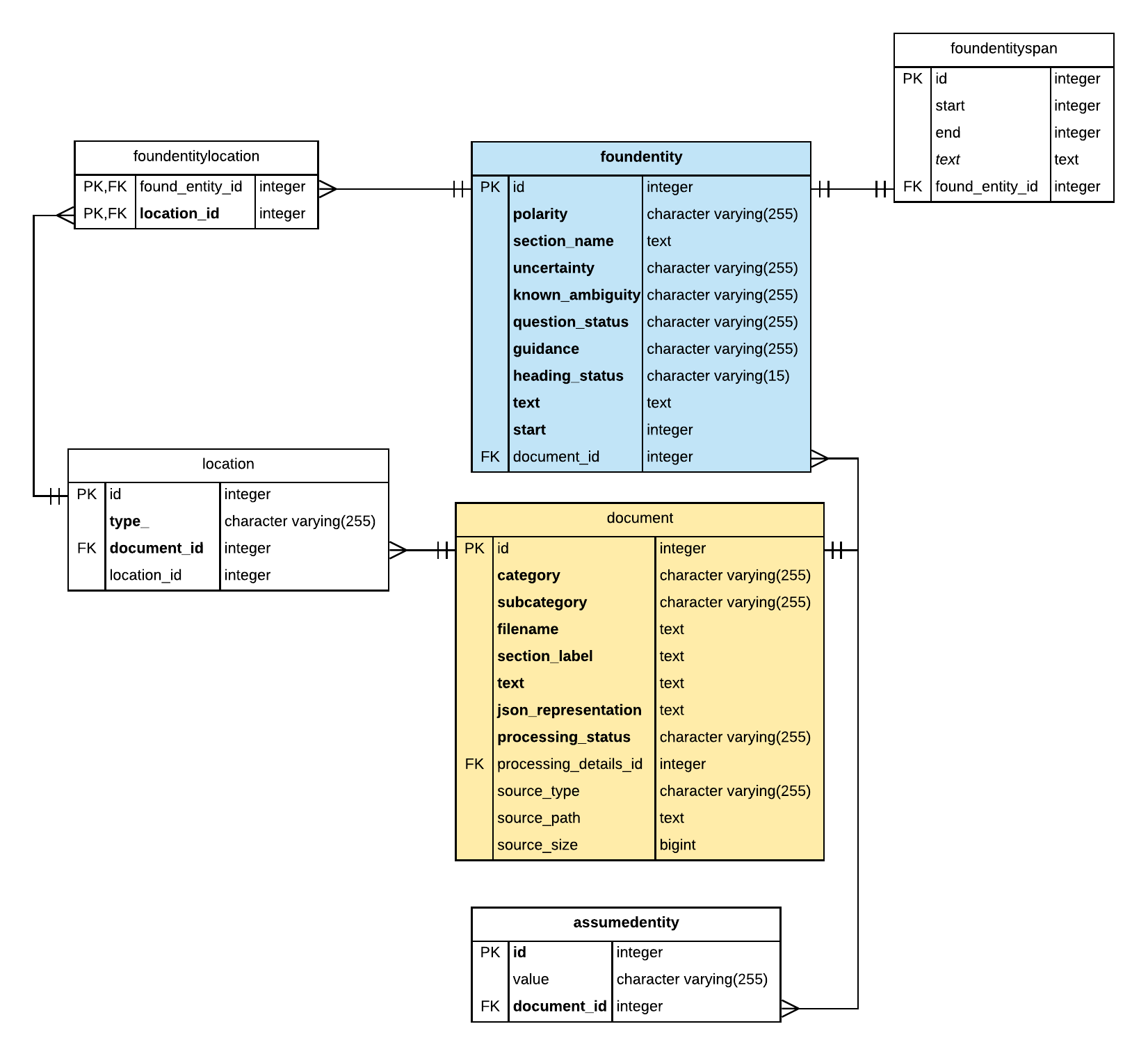
The ER diagram above illustrates the following key points:
- The foundentity table is related to the document table via two join tables: foundentitylocation and location.
- The location table identifies the document id where the entity was found.
- The type_ column indicates whether the location specified is the location of the
sentenceor the location of thesectionfor a given entity. This is discussed in more detail later, see Location Tables.
- The type_ column indicates whether the location specified is the location of the
- The document table contains the following useful data:
- The category and subcategory columns store the report category and subcategory parameters provided in the processing request. See the NLP API reference for list of supported processing parameters.
- The text column contains the text content of a report in its entirety. Note, this column is populated if the
--store-reportsfeature was enabled during processing. - The filename column contains information about the ingestion of the report, which is usually the file path when a file path was used to submit data.
- The section_label column contains the argument provided using
--section-labelprocessing option when this option is used. This optional processing flag instructs the NLP API to extract entities from a specific section of the medical reports that were submitted for processing. For more information about using the--section-labelrefer to the NLP API Python SDK documentation here. - The json_representation column contains the NLP API JSON output. It is populated if the processing option
--store-jsonwas enabled during processing. - The processing_status column contains
successorerror. A row is inserted in this table for each successfully processed document so that the value of this column is alwayssuccess. Note that documents that failed to be processed are not stored. However, when the--store-failedprocessing flag is used, documents that failed will have rows inserted in this table with the processing_status column set toerror. Note:--store-failedis available in Python SDK, v5.21 and higher.
- The foundentityspan table does not relate to location or document tables, but is notable in that in addition to storing the annotated text (in the text column), this table also stores the character offsets that specify the text span of annotated text within the report text.
In the following sections, we provide examples of how to use the information stored in this table.
Query: Distribution of entities by report category and section
This example shows how to find the document category from the document table for an annotated term, for example, aneurysm. The query involves performing inner joins on the following tables: foundentity, location and document.
Query: Distribution of concepts by report category
This query shows how to relate concepts stored in the concept table with document categories stored in the document table using multiple joins as shown below.
Document Attribute Tables
While the document table contains several useful attributes, the NLP API also supports the storage of additional document-related metadata in the following tables:
- documentmetadata table
- processingdetails table
The documentmetadata table, can be used to store additional metadata about source documents. This table is populated during database upload step, after the document submission and processing steps ensuring that the metadata remains local. For instructions see Storing Extended Report Metadata. By storing additional metadata such as the chart date, admission id and optionally subject ids, users can perform more meaningful queries on the dataset without having to perform cross-database joins or implement additional ETL steps in their data pipelines.
The following ER diagram illustrates the relation between the document table and the documentmetadata and processingdetails tables.

The processingdetails table stores the following information:
- The submit_timestamp column stores the date and time when the report was sent to NLP API for processing.
- The job_id column stores the human-readable label which is an optional parameter provided in the processing request.
- The task_id column stores the unique identifier for each processing request. All documents submitted in a request will have the same task id.
- The engine_version column stores the version number of the NLP API server that completed the processing request.
- The sdk_version column stores the client version of the Output Database Client that submitted the processing request.
This information can be used by emtelligent to retrieve non-PHI information about a request such as the ID of the requesting account, and metrics for the request such as the status, size and duration of the workload. The information in the processingdetails may also be useful for data operations managers who need to retrieve data processing statistics.
Query: Find information about documents that failed
The emtellipro-db-client allows users to submit a batch of files in a single processing request. Using Python SDK v5.21 and higher, you can enable the --store-failed processing option to store information about the documents in the batch which failed to be processed. When this flag is enabled, each document that failed will have processing_status column set to error in the document table, and corresponding row in the documentmetadata table. This behaviour useful for tracking processing errors, allowing you to review or resubmit the failed documents.
This query retrieves the filename, chartdate, and submit time for files that failed to be processed by accessing this information from the document, documentmetadata and processingdetails tables respectively.
An empty result is the expected outcome on a healthy corpus: it means no document in the batch failed to process. The table below is empty for that reason.
This query returns no rows against the sample database.
Query: List sections by report category
This query is useful when your dataset contains different types of reports and you want to find the section headings that are present in all report types. This query has two parts:
- First, use a common table expression to generate an in-memory table containing unique pairs of report category and section names.
- Then, aggregate the headings into a comma-delimited list for each report category using the string aggregation function, grouping by report category.
Query: Find in last 5 years of reports
This query is an example of how to use document metadata to find a subset of reports. This query uses the chartdate column in the documentmetadata table to filter for reports created within the last 5 years.
Location Tables
The previous sections explained how to access the document-level tables and attributes from the foundentity table. This section explains how to retrieve the location of the entities, their character offsets and associated text. In the Output Database, you can find the offsets of sections, sentences and annotated terms. The following are important to note about offsets:
- Offsets are specified relative to the first character of the document.
- Offset are specified using a zero-based index.
- Offsets are extracted as a half-open interval
[start, end)such that:- The first character of the term is the start offset
- The last character of the term is end offset minus one
Offsets are found in these tables:
- foundentityspan: The foundentityspan table stores start and end offsets for the annotated term relative to the start of the document. See FoundEntitySpan Table.
- sectionlocationspan: The sectionlocationspan table contains start and end offsets of the section of the report where entities were found. The start and end offsets in the sectionlocationspan encompass the section heading and all sentences in the report section.
- sentencelocationspan: The sentencelocationspan table gives the offsets of the first and last character of sentences where entities were found.
The following ER diagram illustrates the relation between the sectionlocationspan and sentencelocationspan tables and the location table:
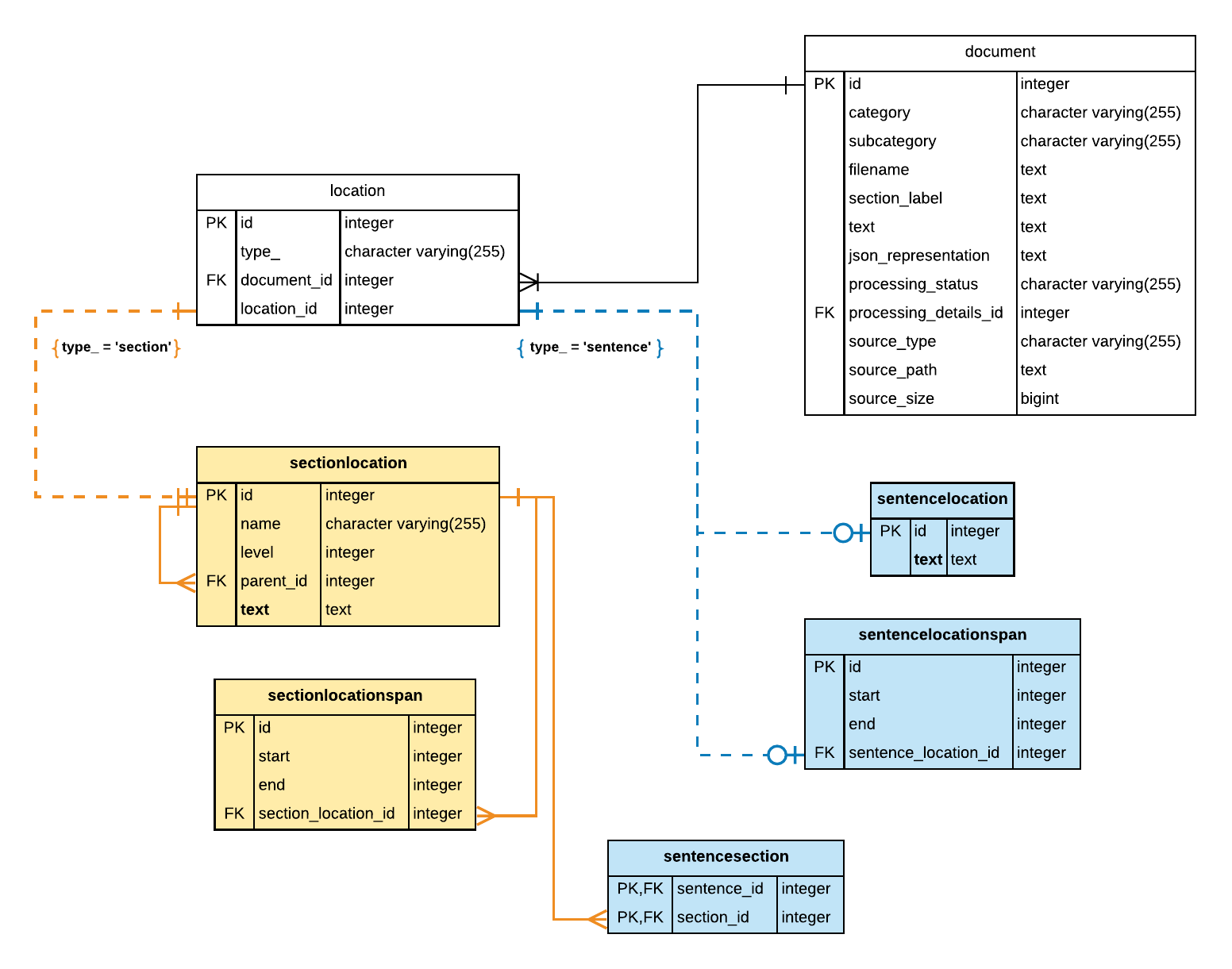
In the ER diagram above, notice the following key points:
- The type_ column in the location table is used to indicate whether the location_id refers to the location of a report section or a sentence as follows:
- When location type_ is
section, the location id references a row in the sectionlocation table - When location type_ is
sentence, the location id references a row in the sentencelocation and sentencelocationspan table.
- When location type_ is
- The text column in the sentencelocation table stores the text for a sentence or null.
- This column is populated only if the
--store-sections-and-sentencesprocessing option was enabled during processing. - This column is indexed for full-text searches. In posgreSQL, this column is indexed using GIN (Generalized Inverted Index)-based index. In MySQL, this column is indexed using the FULLTEXT index.
- This column is populated only if the
- The sectionlocation table is used to support report document formats that have nested or multi-level section headings.
- The sectionlocation table has a parent_id column which is a foreign key reference to itself. When the section is a top-level section, the parent_id is
null. - The sectionlocation.text column is indexed to support fast full-text searches.
- The sectionlocation table has a parent_id column which is a foreign key reference to itself. When the section is a top-level section, the parent_id is
Because sections comprise of sentences, and entities are found in sentences, each entity has two entries in the location table: one refers to the location of the section, and the other refers to the location of the sentence in which they were found. It is therefore essential that when you perform an inner joins with the location table, that you specify the location type in addition to the location_id in the JOIN on clause. The location type is stored in the type_ column and can have a value of sentence or section.
The following queries show how to find text spans for entity and concept occurrences.
Query: Retrieve sentences for a given Concept
Given a SNOMED CT concept for Spleen which has a concept ID of 78961009, how can we find the sentences that mentions this concept? The approach involves finding all entities that are mapped to this concept and looking up the location id for each entity that was extracted. From the location id, you can retrieve the associated sentence in one of two ways:
- Using the sentencelocation table
- Using the sentencelocationspan table. First retrieve the start and end offsets for the sentence containing the entity from the sentencelocationspan table. Then, use the offsets to retrieve the sentence from the document text column in the document table.
While there are 2 ways to retrieve sentences, we recommend that you retrieve sentence text from the sentencelocation table.
Using the sentencelocation table
If the --store-sections-and-sentences option was enabled during processing, you can retrieve sentences from the text column of the sentencelocation table as shown:
Using the sentencelocationspan table
First get the start and end offsets for sentences within a document from the sentencelocationspan table. Then, use the offsets to retrieve the sentence string using the substr function as shown in the following SQL query.
Note, because we are performing a JOIN with the document table we can also retrieve data from other columns in this table, such as the documents’ category and subcategory values, to provide more context in the query results.
Query: Retrieve a Sentence using Full-text Search
The NLP API schema sets up indexes on the sentencelocation.text and sectionlocation.text columns to allow you to perform fast full-text searches on the contents of these fields. This capability is very useful when you want to explore the extracted data without being constrained by the underlying coding of terms or combination of terms to concepts. With this capability, you can easily find any combination of words in sections and sentences.
In this example, we want to find occurrences of corner fracture. While the term fracture is a SNOMED CT concept, the compound term corner fracture is not. To perform a full-text search for corner fracture, you may use the pattern-matching operator and wildcards supported on your RDBMS. For example on postgreSQL, you can use ILIKE, the case-insensitive pattern-matching operator. However, for much faster query execution, you can leverage the GIN index that is set up on the sentencelocation.text and sectionlocation.text columns as shown below.
The query execution time is very fast (less than 2 ms) as shown in the query plan results below, fast enough for interactive applications. Note: this query was profiled using a data set generated from processing approximately 5000 reports.
We recommend you use the simple instead of english text search configuration. The simple text search configuration retains stop words in the query expression. It is important not to omit stopwords because some medical concepts might contain informative stop words and some HGNC gene names are stop words.
The query plan results for the equivalent querying that uses ILIKE operator shows that the query optimizer is unable to use the GIN index. The leading % wildcard symbol in the search expression prevents the query optimizer from using the index and results in longer execution times. The execution time in this case is approximately 100x slower than the previous query on the same dataset.
Query: Combining Full-text Search and Assertions about Entities
A powerful approach for exploring the structured output extracted by the NLP API is to use full-text search in combination with entity-based search.
In the previous example query, we searched for occurrences of corner fracture. While corner fracture does not map to any SNOMED CT concepts, fracture is a SNOMED CT concept and occurrences of fracture are therefore extracted as entities in the Output Database. The NLP API extracts the entity attributes, polarity, uncertainty and section name, for every occurrence of fracture. These attributes of fracture would also apply to the compound term corner fracture by inference.
This query involves using postgreSQL full-text search functions to find sentence location id for sentences containing the phrase of interest. Given a sentence location id, we then find the foundentities associated with the sentence location. As a sentence will typically contain many recognized terms, we must then filter the entities to find only those that represent the term fracture.
Query: Retrieve section contents
Given a SNOMED CT concept for Spleen which has a concept ID of 78961009, how can we find the section text that mentions this concept? There are two approaches you can use:
- Use the sectionlocation table. The text column in this table stores the section text.
- Use the sectionlocationspan table. First retrieve the start and end offsets for the section containing the entity of interest from the sectionlocationspan table. Then, use the offsets to retrieve the sentence from the report text stored in the document.text column.
While there are 2 ways to retrieve sections, we recommend that you retrieve section text from the sectionlocation table.
Using the sectionlocation table
If the --store-sections-and-sentences option was enabled during processing, you can retrieve section text from the text column of the sectionlocation table. The text stored in this column includes the section heading and all the paragraphs that were extracted from report section.
The section headings in the section_text do not exactly match the section names stored in the section_name column of the foundentity table. For example, you may see a heading like ‘Reason for exam’ in the raw text but notice that the value stored in the section_name of the foundentity table is INDICATION instead. This is the case because the NLP API normalizes section headings that it recognizes to the equivalent standardized section names.
The following query shows how retrieve section text from all sections where the SNOMED CT concept Splenic structure was identified:
Using the sectionlocationspan table
The following query shows how to use the substr function to extract the span of text from the report text using offsets retrieved from the sectionlocationspan table.
FoundEntitySpan Table
The foundentityspan table contains the annotated text for the entity in the text column. It also contains the span offsets for annotated terms in the start and end columns. Offset of a span refers the character offsets relative to the start of the document. For details about offsets see Location Tables.
There is a one-to-many relation between the foundentity and foundentityspan table. This is because an entity may consist of multiple terms that are discontinuous (i.e separated by other words). Consider this sentence:
Two terms dull and pain are separated by the descriptors cranial occipital. But, these three entities and corresponding concepts are extracted:
Dull (qualifier value) | 263744001Pain (finding) | 22253000Dull pain (finding) | 83644001
The entity for Dull pain (finding) | 83644001 consists of two annotated terms and therefore has two rows in the foundentityspan table. If you wish to retrieve the span offsets for these terms, you must take this into consideration. Note, however, that most entities have only one annotated term, and discontinous terms are a minority.
Working with Spans
You may need to retrieve spans of annotated terms for various purposes such as: * Bookmarking the location of an entity. If this is the case, it may suffice to simply use the foundentity tables start and text columns. * Highlight an entity and all its annotated terms. In this case you must use the foundentityspan table to find the start and end offsets of all the associated terms.
Query: Retrieve span offsets for entities
The following query shows how to retrieve span offsets taking into consideration the one-to-many relation between entities and annotated terms.
The query uses window functions to aggregate the start and end offsets of discontinous terms. Two approaches for returning the offsets is provided: * an array of tuples representing the start and end offsets of the terms * a combined start and end offset of both terms
The text column in the foundentityspan table will be null if the text data extraction feature was not enabled during processing. In general, it is recommended that you always enable the text feature when processing reports.