

Using SNOMED CT Concept Hierarchies
Introduction
The goal of this section of documentation is to provide concrete examples of how to use the SNOMED CT ontology to best achieve your goals with the Output Database queries. To this end we will:
- Provide a brief overview of SNOMED focusing on those topics that are relevant for data retrieval from Output Databases
- Show how to extend the Output Database by loading relationship definitions from the SNOMED ontology
- Provide several queries to show how to use SNOMED relationship definitions to find related SNOMED concept IDs to use in a query.
The sample SQL queries provided in this document were developed for PostgreSQL. However, Microsoft SQL Server or MySQL-compatible queries can be downloaded from links provided in the References section.
Licensing & Distribution
Before using SNOMED CT, please check your SNOMED CT licensing eligibility.
SNOMED CT is licensed for use free-of-charge in SNOMED member countries which includes (but is not limited to) Canada, USA, and the UK. If you are using and/or deploying SNOMED CT in a non-Member country/territory, you are required to apply for a license through the Member Licensing & Distribution Service (MLDS) on an annual basis.
SNOMED CT Overview
SNOMED CT (Systematized Nomenclature of Medicine - Clinical Terms) is a very large medical ontology, maintained by SNOMED International (https://www.snomed.org), the trading name of the IHTSDO (International Health Terminology Standards Development Organization). SNOMED CT is comprised of 3 different components:
- Concepts
- Descriptions
- Relationships
SNOMED CT codes the words used in medicine into concepts and descriptions. In the context of SNOMED CT, the term concept refers to the unique identifier that is assigned to a clinical idea. A concept is mapped to a set of descriptions, which gives the human-readable term or fully-specified name of the concept. Descriptions also provide information about synonyms and translations. Relationships represent an association between two concepts. While not required, using relationships can significantly simplify and enhance extraction of data from an Output Database. We will go into more detail about SNOMED relationships and how they are codified in the next section.
In addition to these components, SNOMED CT also contains additional information in the form of reference sets. These are used to represent subsets of components. A reference set may refer to:
- An ordered list of components
- A set of associations between components
- A mapping between SNOMED CT concepts and another system of codes, classifications, or knowledge resources.
- A language or dialect of language (e.g. British English (e.g. oesophagus) vs. American English (esophagus)
For the purposes of this documentation, we will focus solely on the use of the Relationships component.
SNOMED Relationships
In SNOMED CT, relationships represent an association between two concepts. Every concept is logically defined relative to other concepts via relationships, and hence the definition of a concept is represented in SNOMED as a hierarchy of related concepts.
There are 2 major classes of relationships:
- ‘Is A’ relationships
- Attribute relationships
In this document, we will only discuss ‘Is A’ relationships. The key points to note about relationships are that:
- Every concept has at least one ‘Is A’ relationship
- A relationship is specified only when the relationship is known to be true.
The ‘Is A’ relationship is the simplest to understand and the most relevant for querying the NLP API data because by finding all concepts that are related to a target concept via ‘Is A’ relationships, we can expand the query to return a wider result set for exploration or analysis. The ‘Is A’ relationship defines an association between a Subtype (or child) and Supertype (or parent) concept. Consider the concept ‘Myocardial Infarction’; when you search for this concept using the SNOMED CT Browser, you will see that it has 12 child concepts, and some of these in turn, have their own child concepts. In this case Myocardial Infarction is the supertype related to the 12 subtypes by the |Is a| defining relationship.
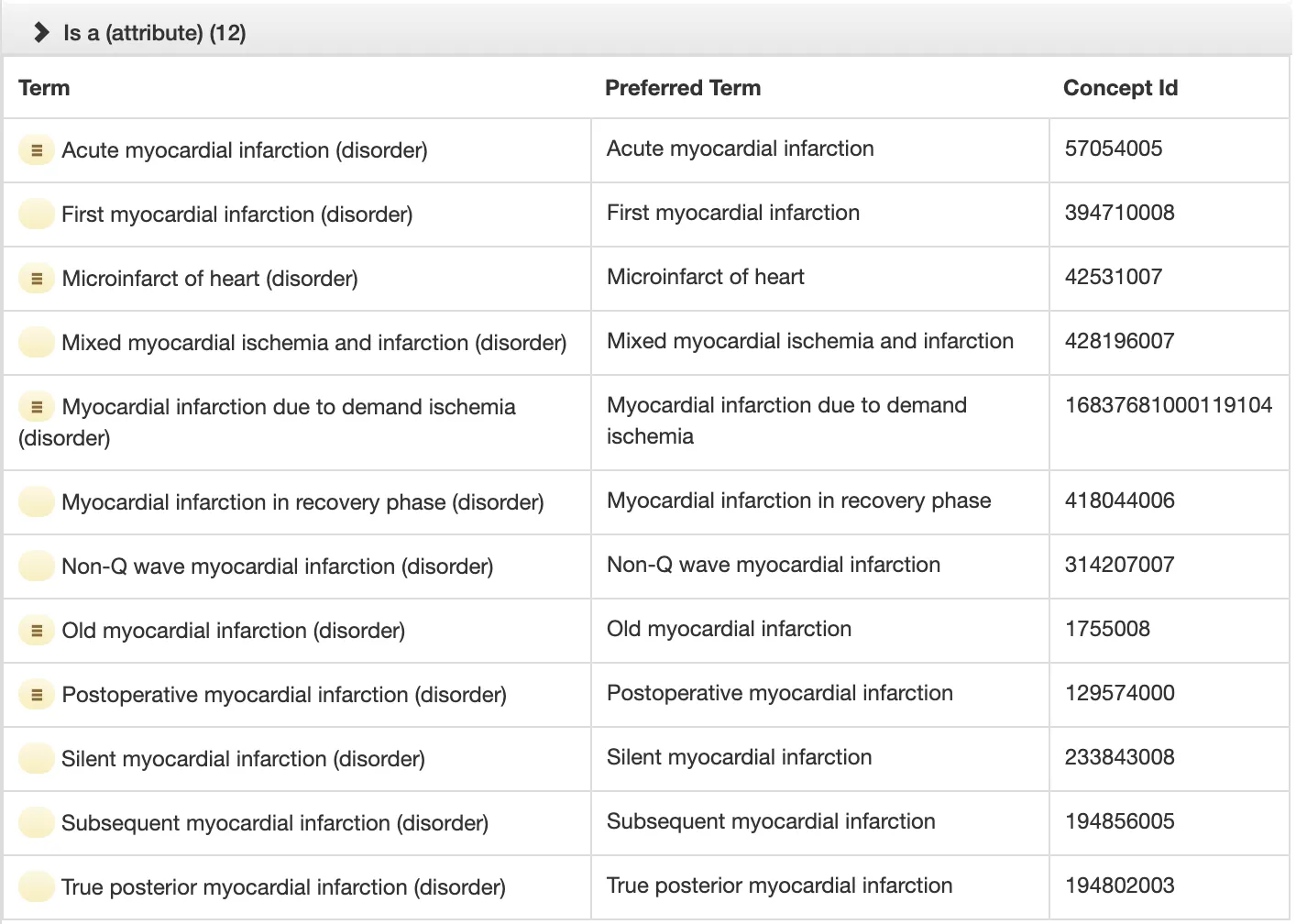
The following should be noted about the hierarchy of concepts in SNOMED:
- The hierarchy can be nested and be multiple levels deep. For example the subtype concept ‘Acute myocardial infarction’ itself has 23 child concepts.
- When
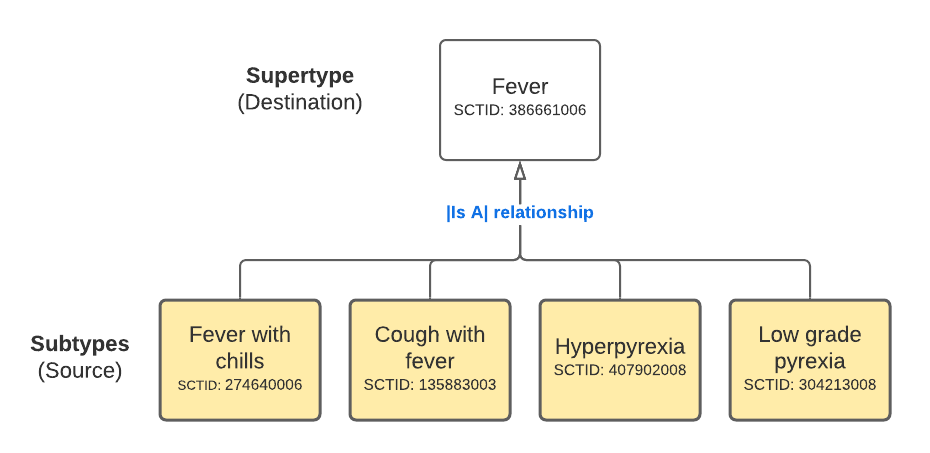
|Is a|relationships are illustrated as directional arrows: the subtype is the source and supertype concept is the destination of the arrows.
The following diagram is an illustration of the partial concept hierarchy for Fever (finding), showing only select concepts from the first level of the hierarchy. Notice the direction of the arrows. Subtypes are source concepts and supertypes are the destination concepts. This detail is important when querying for concept IDs using relationships.
Adding SNOMED relationships to Output Database
SNOMED International allows for significant, country-based extensions to SNOMED CT, which are maintained by medical standards organizations in those countries - e.g. in the US, they are maintained by the National Library of Medicine, part of the NIH.
SNOMED distributes its ontology as a set of files and these files can be loaded into a relational database management system (e.g. MySQL, MS-SQL, PostgreSQL) to allow querying of SNOMED. emtelligent has loaded SNOMED into both PostgreSQL, MySQL and MS-SQL, and exported the relationships table as a compressed .sql file and made them available for download. The files are named as follows:
- sct_relationship{country}_{version}_mysql.zip
- sct_relationship{country}_{version}_psql.zip
- sct_relationship{country}_{version}_ms_sql.zip
- sct_relationship{country}_{version}_snowflake.zip
Note: The above {country} in the filename denotes whether this is a SNOMED US or international release, and the {version} denotes the SNOMED CT release that the relationships table was exported from.
Follow the instructions to import the emtelligent-provided sct_relationship data into your Output Database.
Using emtelligent’s distribution
MySQL
For MySQL server, run the following command:
PostgreSQL
For PostgreSQL server, run the following command:
Snowflake
For Snowflake, loading the relationship definitions into a table in the Output Database is a two-step process consisting of:
- Uploading the provided csv file to an internal stage.
- Executing the provided sql file that creates and populates the sct_relationship table.
To add the SNOMED relationship table:
-
Download the zip file
sct_relationship_{country}_{version}_snowflake.zip. -
Extract the downloaded zip file.
-
Extract the downloaded zip file. You will find 2 files:
- a
.csvfile containing the data in csv-delimited format - a
.sqlfile
- a
-
In the directory containing the extracted files, start a SnowSQL client session.
There are several ways to do this. If using a config file to store connection details, please refer to the SnowSQL documentation.
To start a SnowSQL session, you can also directly invoke the
snowsqlcommand-line client as follows, subsituting the placeholder arguments with the correct values for your instance:
-
Upload the file to Snowflake. Note the following:
- Please do not alter the name of
.csvfile as it is referenced by the companion.sqlfile. - Please upload the file to the root of the current user’s personal stage in Snowflake. The
COPY TOstatement in the.sqlfile expects to find the csv file there. If you upload the csv to a location other than the current user’s personal stage (signified by @~), you must modify the.sqlfile with the preferred location.
To upload the csv file to the root of the current user’s personal stage:
- Please do not alter the name of
-
Execute the
.sqlfile to create and populate thesct_relationshiptable in a Output Database.- Connect to an existing Output Database in Snowflake. Note: If one does not exist, you will have to create a new database in Snowflake and initialize it using the Output Database Client create-db command. For more information about this command, see Preparing the database for storing NLP API output in the Output Database Client documentation.
- In snowsql, at the command prompt execute the provided .sql file. For example:
This script contains SQL commands that creates a table called sct_relationship with the required column definitions, and copies rows from the csv file into it.
Microsoft SQL Server
For Microsoft SQL Server, loading the relationship data into the Output Database is a two-step process: creating the table and then importing the data from tab-delimited text file. You will need to do the following:
-
Download the zip file
sct_relationship\_{country}\_{version}\_ms_sql.zip. -
Extract the downloaded zip file. You will find 2 files:
- a
.tsvfile containing the data in tab-delimited format - a
.sqlfile that contains the table definition for the relationship table
- a
-
Execute the
.sqlfile to add thesct_relationshiptable to an existing the Output Database. For example, you can do this usingsqlcmdfrom the command prompt or by opening the file in the SQL Server Management Studio. Select the target database and then execute theCREATE TABLEstatement. This will add a table calledsct_relationshipto your database with the required column definitions. -
Use the SQL Server Management Studio, to import data from the .tsv file as follows:
-
In the Object Explorer, right-click on the destination database. In the right-click menu, click
Task>Import Data. -
In the Choose a Data Source dialog, select
Flat File Source.- Browse and find the
.tsvfile. - Change the Header row delimiter character to
{LF}. - In the Choose a Data Source dialog click Advanced (in the left-hand panel) to reveal the advanced data type settings for flat-file imports.
- Then click the
Suggest Typesbutton. ClickOKbutton to dismiss the Suggest Types dialog. - Review the suggested types for each column shown in the right-hand panel of the Advanced view. Ensure that the data types are set as follows:
- Select 8-byte signed integer (DT_I8) for these columns: id, moduleId, sourceId, destinationId, typeId, modifierId, characteristicTypeIdid
- Select 1-byte signed integer (DT_I1) for these columns: active, relationshipGroup
- Select Date (DT_DATE) for these columns: effectiveTime
- Browse and find the
-
In the Choose a Destination dialog:
- Set the Destination to
SQL Server Native Client 11.0 - Set the Database to the target Output Database.
- Set the Destination to
-
Click to Next to advance through the dialogs presented, and finally click the Finish button to begin the import.
-
For MS SQL Server, the two step approach above was chosen because it works reliably on systems that have sufficient in-process memory for SQL Server Management Studio to load and run large .sql files.
You can also use the sqlcmd to execute DDL SQL script and to BULK INSERT the data using the commands below. However, before running must first ensure that the database user has sufficient sql server permissions to perform a bulk insert and file permissions to read the requisite files:
Using IHTSDO files
If you are using a specific edition or version of the SNOMED CT, you can download the release files directly from IDHTSO: the organization that maintains and publishes the SNOMED-CT ontology. For example, you can download the International edition or the US edition.
You will then need to load these into a database using open source database loading scripts available on Github.
The Relationship Table Schema
SNOMED-CT Relationships are stored in the relationship file, which when loaded into a database, creates a table with the following schema. The columns that we will be using most often in the Output Database queries are bolded.
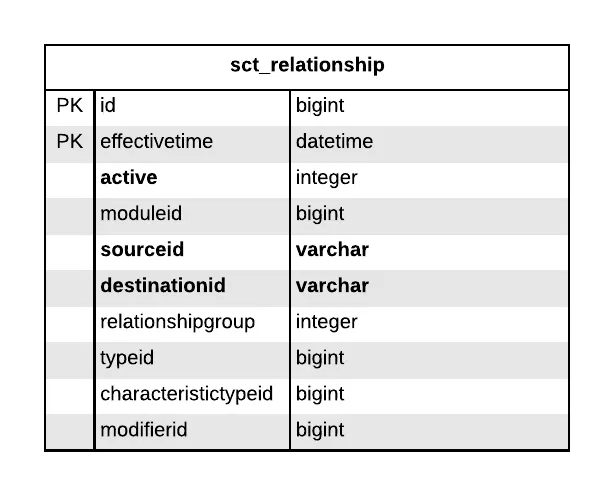
The descriptions for these columns/fields are:
-
id - a unique identifier for the relationship.
-
effectiveTime -the datetime when the relationship entered usage
-
active - either a 1 to denote ‘active’ or a 0 to denote inactive/no longer in use
-
moduleId - only contains a few different values:
900000000000012004- SNOMED CT model component module - these are relationships related to concepts pertaining SNOMED itself900000000000207008- SNOMED CT core module - these are the relationships for the SNOMED-CT core clinical concepts731000124108- US National Library of Medicine maintained module - these are the relationships between concepts added by the US NIH’s National Library of Medicine
-
sourceId - The sourceId is a SCTID (snomed concept id) and it identifies the concept being defined by the relationship. In the case of a hierarchical
|Is a|relationship, the sourceid refers to the subtype or child concept. -
destinationId - The destinationId is a SCTID that represents the value of the defining relationship. In the case of a hierarchical
|Is a|relationship, the destinationid refers to the supertype/parent concept. The destinationid may refer to a concept in the same extension module as the source concept, or any module on which this extension module depends. -
relationshipGroup - The relationshipGroup is an integer that indicates whether or not the relationship is grouped together with other relationships associated with the same source concept. Any relationships with the same sourceId and relationshipGroup integer (other than zero) are considered to belong to the same relationship group. A relationshipGroup of zero (i.e. “0”) indicates that the relationship was not grouped with other relationships by the terminology author. This is a complex topic, and is better described here.
-
typeId- This is a SCTID for the type of relationship that there is between the concepts. In the July 2020 International release, there are 122 different relationship types. Examples of relationship types would be: due to, associated with, is a, finding site, interprets, or Has product characteristic. In most cases, the typeId will refer to an international concept. However, additional attribute concepts may be added in an extension if there is a legitimate clinical need. For the purposes of this documentation, we will only concern ourselves with the
|Is a|relationship type. The is a relationship is denoted as|Is a|in SNOMED nomenclature, and its concept id is116680003. -
characteristicTypeId - This has two values in the international release; it specifies whether this relationship was stated by the author or was inferred by a description logic classifier. The two values are:
900000000000011006- Inferred relationship (core metadata concept)900000000000227009- Additional relationship (core metadata concept)
-
modifierId - The modifierId attribute is a SCTID which specifies the type of description logic that applies to the given relationship - existential restriction (i.e. ‘there exists some’) or universal restriction (i.e. ‘there exists only’). All relationships in the International Edition use the value
|Existential restriction modifier|. This value is also recommended for extension relationships, as the value|Universal restriction modifier|can significantly affect the speed of classification.
Concept hierarchies in SNOMED may contain duplicate concepts. The same concept may be referenced in multiple branches of a concept tree. To return a set of concept subtype ids (with no duplicates), you must use a recursive query and also SELECT DISTINCT to remove the repeated concepts.
The following queries illustrate how to query the sct_relationship table.
Query: Find concept IDs for immediate supertypes
This query finds the immediate supertype or parent concepts of ‘acute myocardial infarction (disorder)’ with which it has a |Is A| relationship. The Supertype concept is a more general concept and hence extends the query to return more hits.
Because we want the supertype concepts, we select the destinationid field.
The key points to note about this query are:
- We test the sourceid field for SCTID
22298006, ‘Myocardial Infarction (disorder)’. - We search only for relationships that are ‘Is A’ relationships by specifying the typeId as
116680003- the Concept ID for Is a (attribute). Important: As SNOMED identifies many types of relationships between concepts, this constraint is required. - We ensure that no inactive or superceded entries are returned.
SQL
Query: Find concept IDs for immediate subtypes
This query returns the immediate subtypes of Myocardial Infarction (disorder). We do this by retrieving the sourceid values of relationships where the destinationid is the concept of interest. By doing so we will usually find a large number of more specific child concepts.
In the WHERE condition we filter for rows where destinationid is the SCTID for Myocardial Infarction (22298006).
SQL
Notice that there are only 15 immediate children concept IDs.
The sct_relationship table does not store the fully-specified name of the concept just their IDs. In the next section, we will show how to use the SNOMED CT sct_relationship table in conjunction with the Output Database tables in queries.
Query: Find all subtypes using recursion
The previous query returns 12 subtype concepts for Myocardial Infarction. However, we know that this concept has many more subtype concepts, as it subsumes child concepts like ‘Acute Myocardial Infarction’ which itself has 23 children.
The following query finds all the subtypes concepts for Myocardial Infarction by using a recursive CTE (common table expression) to find all child concepts in the hierarchy. The logical constraint on the INNER JOIN statement shown below finds children concepts and terminates when no more |Is A| relationships are found for the target concept.
Concept hierarchies in SNOMED may contain duplicate concepts. The same concept may be referenced in multiple branches of a concept tree. Hence, the DISTINCT keyword is used to removed duplicate concepts from the IDs returned by the recursive CTE. This is particularly important if you subsequently perform a table join with the output of the sctids recursive CTE given below.
SQL
Microsoft SQL Server
Notice that many more concept IDs are returned.
Querying NLP API using SNOMED relationships
Before we can use both tables in a query, we need to understand how these tables relate to each other. The following ER diagram illustrates the relationship between the NLP API’s concept table and the SNOMED CT sct_relationship table.
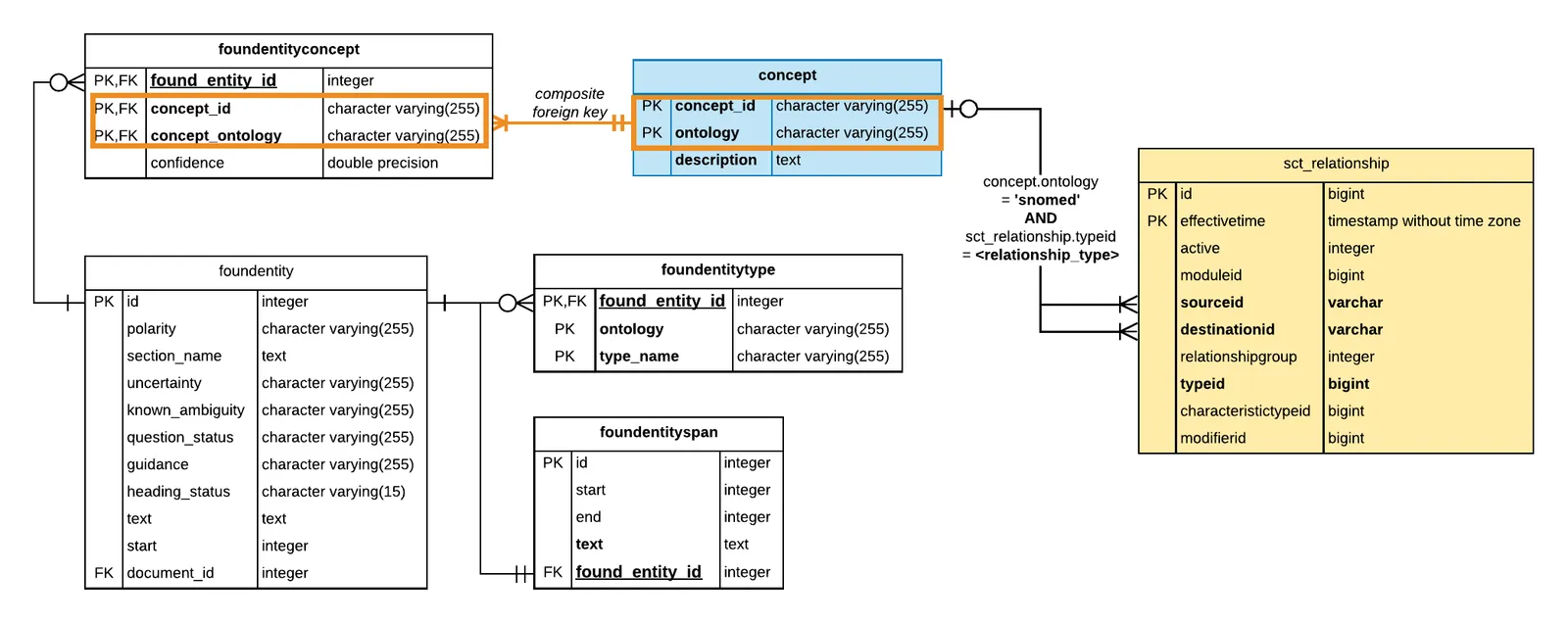
Notice that the sct_relationship is not related to any Output Database tables via foreign keys. However, the values in the sourceid and destinationid columns contain SNOMED concept IDs which correspond to the concept_id in the NLP API’s concept table.
When performing an inner join between the sct_relationship table and the concept table, you must test for equality as follows sct_relationship.sourceid = concept.concept_id AND concept.ontology = 'snomed. The later constraint is required because concept_id values in the Output Database are not guaranteed to be unique across ontologies.
Query: Find subtypes and their fully-specified name
The sct_relationship table does not store the fully-specified name (FSN), only concept IDs. This query shows how to display the FSN for those concepts in the Output Database. Note that the NLP API concept table contains only those concepts for entities that were extracted during processing, which is a subset of the concepts in the SNOMED ontology. Hence, in the results for this query we do expect to find many null values for those concepts not present in the dataset. Regardless, this query is useful because it shows the occurrence of subtype concepts in the data.
In this query, we will find the subtypes or child concepts of ‘Myocardial Infarction (disorder)’, and display their FSN by using a left outer join.
SQL
Microsoft SQL Server
In the query results, we find in our dataset that several subtypes of ‘Myocardial Infarction (disorder) were mapped to recognized entities. The next query shows how to perform a query to retrieve these entities and their attributes.
SQL
Microsoft SQL Server
References
- Snomed CT Technical Implementation Guide, Technical Overview.
- Snomed CT Relationship table SQL download.
- SNOMED CT Files International Edition. The NLP API uses the International Edition.
- SNOMED CT Files US Edition.
- IHTDSO SNOMED Database Loader.