

Overview of Relations Table Schemas
JSON Data Model
Before working with the NLP API relations, it is helpful to have an understanding of the data model of the NLP API JSON result format. In the NLP API JSON output, you will find a relations object. The following excerpt shows an empty relations object generated by a processing request where no feature relations were selected:
Note the following:
- Each relation type (e.g. experiencer, or follow-up relations) is represented by a child attribute which is an array containing relation-specific objects.
- The JSON example above has empty arrays because it was generated by processing request where no feature relations were selected. Typically, however, patient records will contain many instances of experiencer relations. For example, the
experiencersarray will contain many instances of experiencer relations when theexperiencer-relationfeature is enabled during document processing. - The data model of relation objects varies depending on the feature relation type. For more information, refer to the specific documentation for the feature relation of interest.
Relation Tables Overview
The relation table represents the relation between instances of extracted relations, their types, and the document from which they were extracted. The following ER diagram shows the data schema of relations tables.
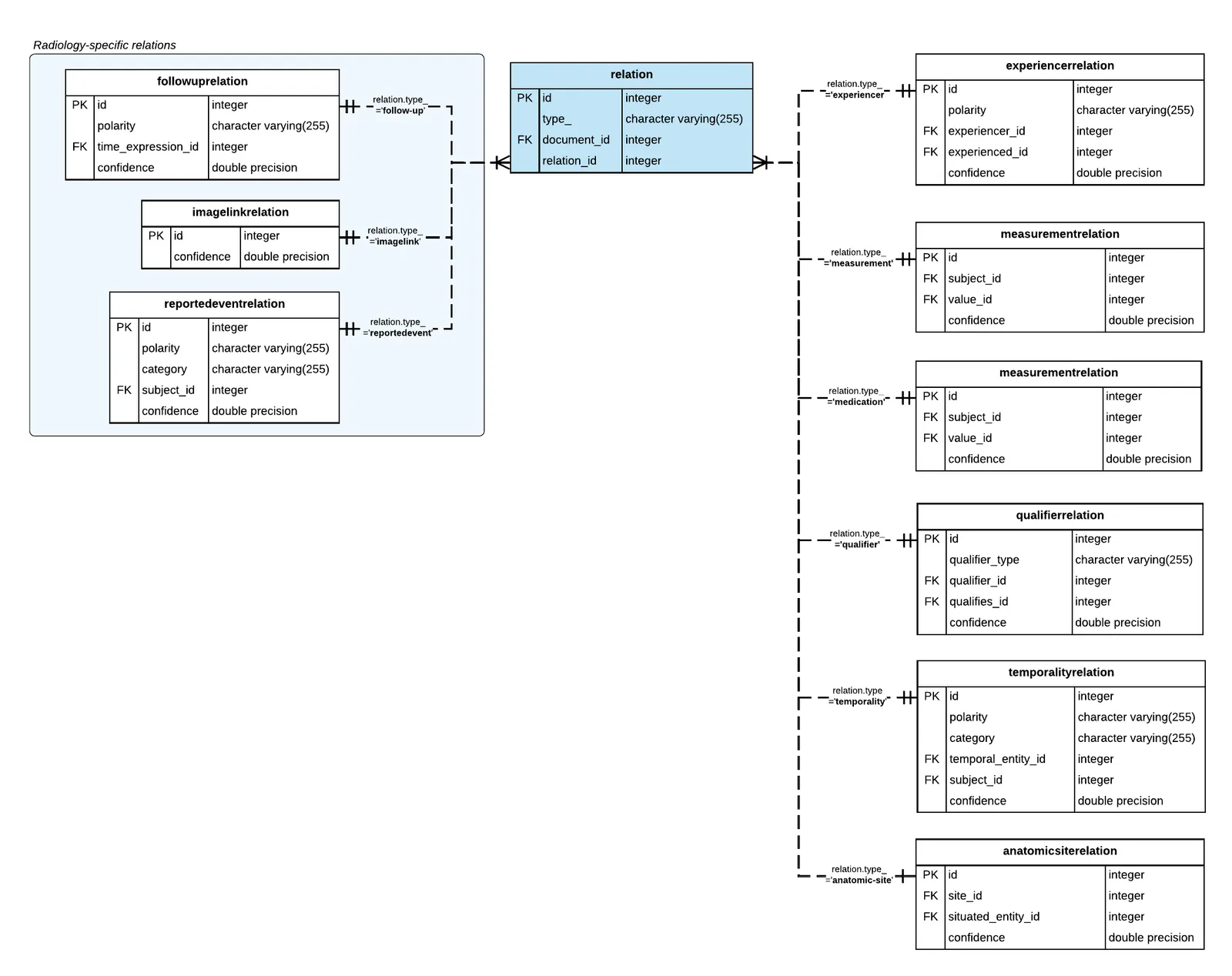
In the table above, notice the following:
- Each type of relation is stored in its own table.
- The relation table is related to child tables, each representing a specific relation type. The reference is a boolean condition on the relation_id and the type_ column. The relation_id references the primary key in a child table as specified by the value in the type_ column. For example, when the type_ value is
followup, the relation_id is the primary key in the followuprelation table. - The type_ column stores one of the following labels:
experiencer,measurement,medication,qualifier,anatomic-site,temporality,follow-up,imagelink, andreportedevent. - The document_id is a foreign key reference to the document table, see Document-level Tables.
Query: List feature relations types
To find what types of relations and how many instances are present in your data set, simply query the relation table, and group by the type_.