

Find Entities in CCD Sections which have no Coded data
Synopsis
This query shows how to retrieve the NLP API entities from sections in a C-CDA Document that have no coded entries.
This query finds sections in a C-CDA Document that have no XML entries of interest such as Observations (OBS class), Procedures (PROC class), or Immunization events (SBADM class). It then retrieves disorders and procedure SNOMED entities that are positively asserted from these sections. This is useful when we want to avoid retrieving entities from sections containing information you may have access to from sources that manage or author structured information (e.g. an EHR or other CDA document management systems )
To find such sections, we will need information from 3 sources:
- The coded entries found in C-CDA sections,
- entity information extracted by the NLP API
- A mapping table that maps C-CDA sections to normalized section names (using section Object Identifiers or LOINC codes )
Processing Requirements
For this query, Continuity of Care Documents were processed. See processing requirements Processing Requirements.
Prerequisites
This query uses a mapping table containing mapping of section OIDs to NLP API section names. This table must be added to your database as it is not part of the Output Database. The following shows an excerpt of this mapping table:
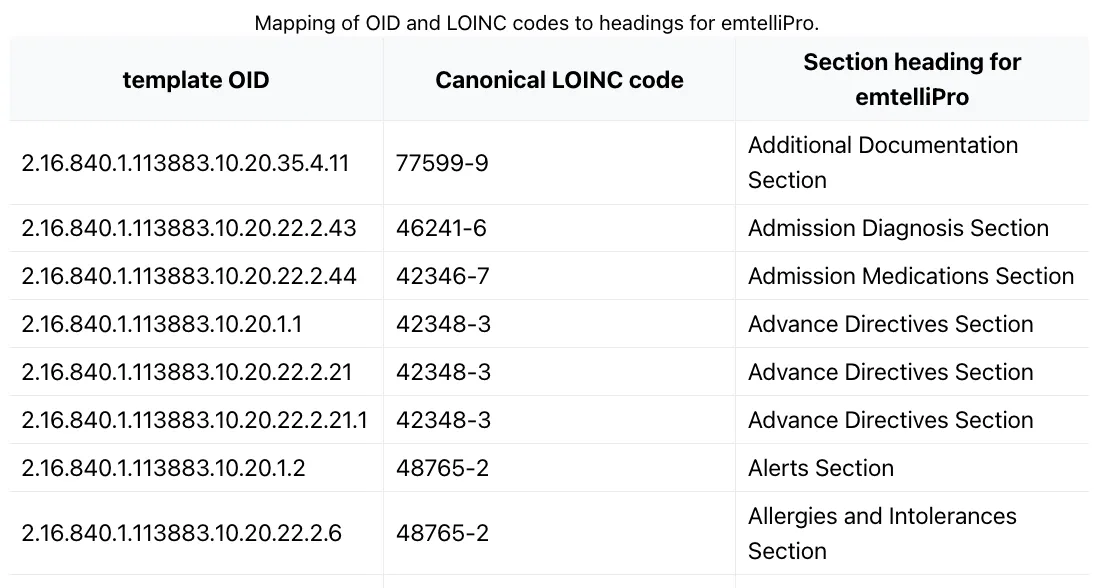
To do this, you will need to:
- Create a CSV file containing the contents of the mapping of Section OID and LOINC codes to NLP API section names. This table is found in the C-CDA Section Mapping page in the Python Client SDK Documentation set. Contact support@emtelligent.com for assistance.
- Upload the CSV file to the database that you are using to a table named
sectionmap. We will use this table in the query below.
Background
C-CDA documents contain both coded and narrative non-coded information. Coded information refers to the data that is stored in the \<entry\> elements in each C-CDA section. However some sections contain purely narrative notes and no coded entries. This query shows how to selectively retrieve NLP API NLP extracted information from such sections.
The query consists of 4 steps:
- Step 1: For each section, find section Object Identifier (OID) or LOINC code and look up the corresponding the NLP API-normalized section name from the
sectionmaptable - Step 2: Find the coded entries of interest (typically observations and procedures)
- Step 3: Find those sections that have no coded entries
- Step 4: Finally, get the NLP API entities from those section using thier normalized section names.
SQL query
PostgreSQL
References
- See Python Client SDK Documentation for more information about CCD file support.