

Reported Event Relations
This section describes the reported event relation, its NLP API JSON output and database schema. It also contains a sample query that illustrates how this relation can be used.
After reading this page, we hope you will:
- Understand what reported event relations are.
- Understand what attributes are extracted for this relation.
- Know how to find reported event relations and their attributes.
The content in this section builds on the concepts and data models explained in earlier sections (see Entity-level Tables).
Reported event relations are only extracted from these sections of Radiology reports: FINDINGS, IMPRESSION, COMMENTS and CRITICAL RESULTS COMMUNICATION, and other sections mapped to these sections. For example, the heading CALLED REPORT is mapped to CRITICAL RESULTS COMMUNICATION.
What are Reported Event Relations
Reported event relations are identified in text when the text details that a person has communicated (or reported) something to another person. An example of this would be, "His father told Dr. Lee this morning that his cough was getting worse." In this example, the patient’s father reported an event (worsening of a cough) to Dr. Wong, at a certain time (this morning). The initial implementation of this relation in the NLP API is a special use case, that of critical results communication, used when a diagnostic physician identifies a finding on a diagnostic test that requires direct communication with the care provider who ordered the test.
From the US Joint Commission 2022 Hospital National Patient Safety Goals (NPSGs) report, the #2 goal is to “Improve the effectiveness of communication among caregivers” with the key objective being the timely reporting of critical results of tests and diagnostic procedures (NPSG.02.03.01) . Critical results of tests and diagnostic procedures that fall significantly outside the normal range may indicate a life-threatening situation. The NPSGs recommendations for this safety goal include the following:
- Develop written procedures for managing the critical results of tests and diagnostic procedures that address the following:
- The definition of critical results of tests and diagnostic procedures
- By whom and to whom critical results of tests and diagnostic procedures are reported
- The acceptable length of time between the availability and reporting of critical results of tests and diagnostic procedures
- Implement the procedures for managing the critical results of tests and diagnostic procedures.
- Evaluate the timeliness of reporting the critical results of tests and diagnostic procedures.
(The above points are excerpts from Hospital NPSG 2022)
In the field of diagnostic medicine, to achieve this safety goal the diagnostic physician (e.g. a radiologist, nuclear medicine physician, pathologist, or cardiologist) that identifies an important diagnosis must, in addition to proper documentation of the finding in the patient’s medical report report:
- communicate the result directly, and
- record in an auditable fashion that this communication had occurred.
Hence, it is commonplace to find sentences in medical imaging reports like “These findings were relayed via telephone to Dr. Smith at 0900h”.
To address the need to report and monitor the communication of critical results as a safety statistic, medical software vendors have developed tools and workflows to capture critical communications but uptake and actual day-to-day usage (at least anecdotally) has been poor. While diagnostic physicians are good at picking up the phone and communicating results, the extra step to record this event in a separate tool or workflow is a deterrent. A simpler and more natural workflow only requires physicians to remark at the end of reports that results were communicated. NLP-based data extraction is then used to generate the required reports. The reported event relation was designed specifically with this use case in mind.
The NLP API’s reported event relation captures the notion of a communication between two groups of entities and associated attributes from sentences like this:

The subject must be present for the report event to be extracted. The other attributes may be omitted, and often are.
Other examples of sentences from which reported event relations can be extracted are:
In the above case, ureteral calculi is the subject.
In this case, two physicians were informed and multiple time expressions are provided.
The reported event relation attributes extracted by the NLP API are:
- Subject: The
subjectentity is the topic of the communication. - To entity: The
personwith whom it was discussed, preferably a proper name like Dr. Smith, but possibly something likethe attending physicianas the author may not recall the physician’s name. - From entity: The
personthat delivered the critical result. This is often omitted as it it assumed to be the author of the report - Time Expression: The
time and/or datewhen the finding was discussed. Often just a time is reported (e.g.0900h,13:40 hours,1:30 pm) as it is implied that the date is the date of dictation, but the full date and time may also be reported. - Communication method: The
methodof communication (e.g. paged, telephoned, discussed in person, etc). - Polarity: The
polarityattribute for this relation indicates whether the communication event occurred (polarity ofasserted) or did not occur (negated). - Category: The only supported category of temporality is
critical_resultsat the current time.
For more complete reporting of reported events, software vendors may opt to use report templates or other mechanisms to prompt the user to provide these details when documenting the critical communication.
Definition of Critical Results
The NPSG does not specify the disorders or findings that constitute critical results. Typically, any diagnostic results which are potentially life-threatening acute findings or pathologies should be considered. The definition of critical results will be specific to a given medical service. For example, in radiology reports critical results would include findings such as (but not limited to) infarcts, hemorrhages, fractures, pneumothorax, ectopic pregnancies etc. The NLP API allows you to specify the set of disorders or findings to be considered critical results at query time. See Query: Find all reported event relations.
To cast a wide net, you may also consider searching for all clinical findings by performing a hierarchical concept search for the SNOMED concept 404684003 | clinical finding (finding). For more information about using SNOMED CT concept hierarchies in queries, see Using SNOMED CT Concept Hierarchies.
JSON Data Model
Below is the NLP API’s JSON result output for a reported event relation extracted from this statement:
From the JSON output above, we see that:
- The
reportedeventsarray is an element of the relations object. Each element of this array is a single object representing a reported event relation instance. - Each reported event relation instance has several named arguments: the
subjectand theto_entities,from_entities,methods,time_expressions - Note that the
subjectis required. The other arguments are optional (i.e. the reported event relation will be extracted even when the author has not provided values for them). - It is important to note the cardinality of the relation between subject and the other arguments. There is a one-to-zero-or-more relationship between the
subjectand otherarguments. - A reported event relation has 2 attributes: category and polarity:
- category: The only supported category of temporality is
critical_resultsat the current time. - polarity: This attribute is indicates whether the physician remarked that the result was communicated (
asserted) or was NOT communicated (negated). In practice, thenegatedcase rarely occurs.
- category: The only supported category of temporality is
Reported Event Relation Tables
In the Output Database schema, reported event relations are stored in the reportedeventrelation table. Its attributes are stored in correspondingly-named tables as shown in the following ER diagram.
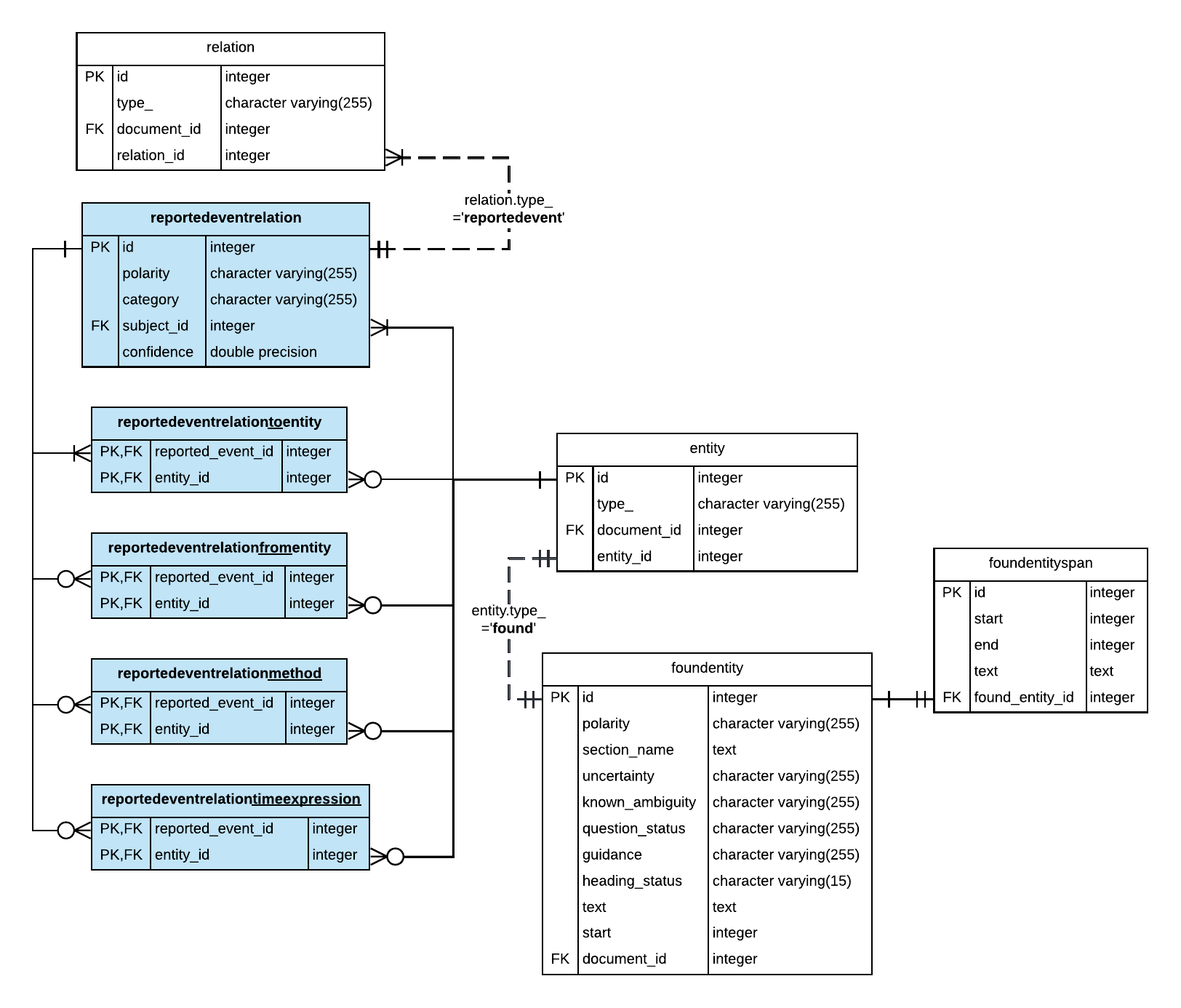
A few key points should be noted about this schema:
- Each reported event relation relates to exactly one subject term. Each subject mentioned is extracted as an entity in the Output Database schema, and has a corresponding row in the entity and foundentity tables respectively.
- Like the subject entity, arguments of the reported relation (e.g. the method, receiving and sending physician ) are also entities and also have corresponding rows in the entity and foundentity tables. For the
to_entityandfrom_entity, which are typically proper names, you will need to retrieve their value as the annotated term from the foundentity table. - A subject can have zero or more instances of the other argument types; for example, a critical result may be communicated
by phoneandin person(methodarguments), to theattending physicianand the patient’sprimary care physician(to_entities), but the time of the event may be omitted. This is be important to remember when writing queries to retrieve all extracted values. An additional aggregation step will also be required to aggregate the terms or concepts for each attribute type.
Because there is a one-to-zero-or-more relationship between the subject of a reported event relation and other arguments (e.g. to_entity, from_entity etc), when querying for reported event relations you must use LEFT JOINs and aggregate the values retrieved for these arguments. See Query: Find all reported event relations.
Sample Queries
In this section, we present SQL queries that retrieve information about reported event relations for initial data exploration. An example is provided:
Query: Find all reported event relations
This query finds all extracted reported event relations and their attributes. This query is useful for reviewing the output of the reported event relation extraction feature.
The following query uses the reportedeventrelation table and performs joins with the entity and foundentity tables to retrieve the term (annotated text), section heading, and sentence. Because we want to return one row per reported event, we must handle the cases where multiple values are given for each argument (e.g. when results are communicated to multiple physicians). To do this, we concatenate the values for each argument separately in a CTE using the string aggregation function before assembling the values in the outer SELECT clause.