

Writing a Custom NLP API Client
This document shows you how to write a simple custom NLP API client using JWT based authentication. This client can be used to submit documents to an NLP API server using the JSON input format.
Start with the Getting Started page if you haven’t already gone through it.
You may not need to write your own custom client. Choose an NLP API Client provides a list of clients you can use and the advantages of each type of client.
The NLP API Python SDK comes with a client emtellipro-db-client which can be used for file and database input as well as database output and with support for C-CDA/CCD XML or PDF documents.
The NLP API also supports HMAC authentication and this is still supported although we expect to deprecate this in the future. You should use JWT based authentication instead of HMAC authentication, however the NLP API documentation still refers to the use of HMAC authentication. The Python SDK and client also still uses HMAC authentication.
JSON-based Document Submission
In this tutorial, we will submit documents to the NLP API using the JSON input format. This format uses the following fields:
id: a unique identifier for each document submitted. Must be unique within each submission, but can be re-used between submissions. This field is required.category: one of the supported NLP API document categories must be used. If in doubt as to what kind of document category your document might be, a value ofClinical(case-insensitive) is suggested. This field is required.subcategory: one of the supported NLP API document subcategories must be used. If in doubt as to what kind of document subcategory is present, a value ofgenericis suggested (case-insensitive) although only some of the categories acceptgenericas a subcategory. These are outlined in the NLP API specification. For subcategories with a space character in them please make sure they are provided inside quotes, e.g."Discharge Summary"is a subcategory for theClinicalcategory. This field is required.text- the text of the document, escaped properly for JSON formatting. This field is required.type- a value ofplainshould be used. This field is optional and included for legacy reasons.
Multiple documents can be submitted in JSON-based document submission up to a maximum size of 2 MB of text per document and a maximum submission size of 500 MB.
An example of 2 NLP API input JSON-formatted documents is shown below. In the code examples later, save this JSON to a file and save the filename to an environment variable FILE_NAME.
Submission Process
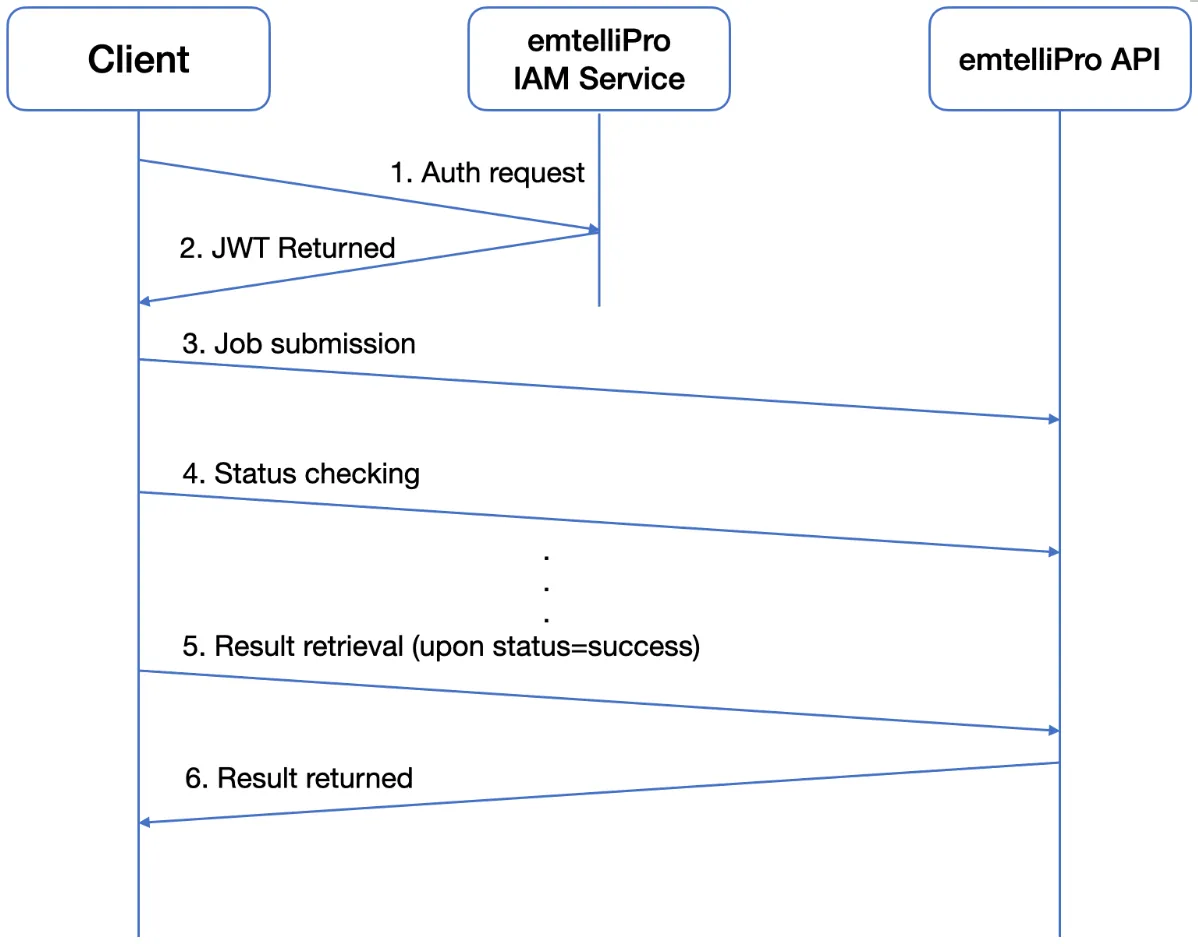
The submission process involves the following steps:
- Authentication with the NLP API IAM service to obtain a valid JWT which is used for authentication of all of the following steps
- Submission of document(s) to the NLP API & obtaining the job task ID
- Checking the NLP API repeatedly for job status using the task ID until status=success
- Retrieval of processing results using the job task ID
A diagram showing these steps is shown below, omitting acknowledgements and status results:
Using cURL
To explain how to authenticate your credentials against the NLP API and submit documents for processing, this section provides a shell script that uses cURL for authentication and submitting documents that are in the JSON input format described above.
The script shows an example of submitting a document to the NLP API and getting the results. It uses only cURL and jq, which must be installed on the system running the script.
Some caveats about the script:
- It only supports JWT auth; HMAC auth not supported.
- It only supports JSON input format.
The command line option -F "file=@$FILE_NAME; type=application/json" in cURL sets the multipart form headers appropriately as per the NLP API specification.
This script has been validated to work with jq version 1.7 and cURL version 8.1.2, although it may work with other versions as well.
If debugging is required, users can dump out the cURL submission(s) by adding a --trace-ascii - command line option after curl.
Summary
The various authentication steps used in the cURL command above can be used to construct your own http requests using any http library in your favorite programming language. The shell script provides a step by step guide to writing your own custom client in any programming language of your choice. Please contact us if this guide does not meet your needs.