

Entity-level Tables
In this section, we explore the schema representation of Entities, their attributes, and how they relate to standardized ontologies via Concepts and Entity types. We will present sample queries to show how to retrieve useful information from the entity-level tables. We have also provided some helper queries at the end of the section that list various data labels, such as ontology names and semantic types, that can be used as filter parameters.
After reading this page, you will be able to:
- Explore the entities extracted by the NLP API
- Query for entities with specific attributes
- Search for entities by ontology, concepts, or semantic types
- Show the annotated terms that were detected by the NLP API’s entity recognition engine
Entity, FoundEntity and AssumedEntity Tables
Entity objects represent terms that are recognized and extracted by the NLP API. These are stored in the entity table. An entity can be of two types: found and assumed. Found entities are those entities that are explicitly mentioned in the report. Found entities are explicit references to the patient, recognized terms, and report sections. Assumed entities are implicit references to the patient, and are used when querying for Experiencer relations (see Experiencer Relations).
Information about FoundEntities is stored in the foundentity table. This table contains many key attributes such as the report section where the entity was found, the polarity, and uncertainty of the entity.
- The section_name column stores the heading of the report section where an entity was found. Knowing the section where an entity occurs provides important context for data analysis. For example, a disorder mentioned in the
PAST MEDICAL HISTORYhas a different connotation than a disorder mentioned in theDISCHARGE DIAGNOSISsection. To make data analysis easier, the NLP API normalizes section information by mapping commonly found headings to standardized headings. The value stored in the section column depends on the document type processed. For Radiology reports, for example, typical sections areINDICATION,TECHNIQUE,FINDING,IMPRESSION,COMPARISON, andADDENDUM. - The polarity table column has the value
assertedornegated - The uncertainty table column has the value
certainoruncertain - The heading_status table column that indicates if the entity is inside of or outside of a section heading has the value
inside_headingoroutside_heading - The text table column stores the annotated text for the entity
- The start table column stores the start offset of the found entity. The start offset and the text is useful for locating an entity in a body of text.
In addition to these attributes, the NLP API recognizes a third type of attribute: the measurement unit. This attribute is extracted when the entity-measurement-unit feature or the measurement-relations feature is enabled during processing. Because of the one-to-many relation between measurement entities and their units, measurement unit attributes are stored in its own table: the foundentitymeasurement table. Measurement values and measurement units attributes are discussed in-depth with respect to Measurement Relations. Note, however, measurement unit attributes can also be extracted independently of measurement relations.
The following ER diagram, shows the relation between the entity, and foundentity and related tables.
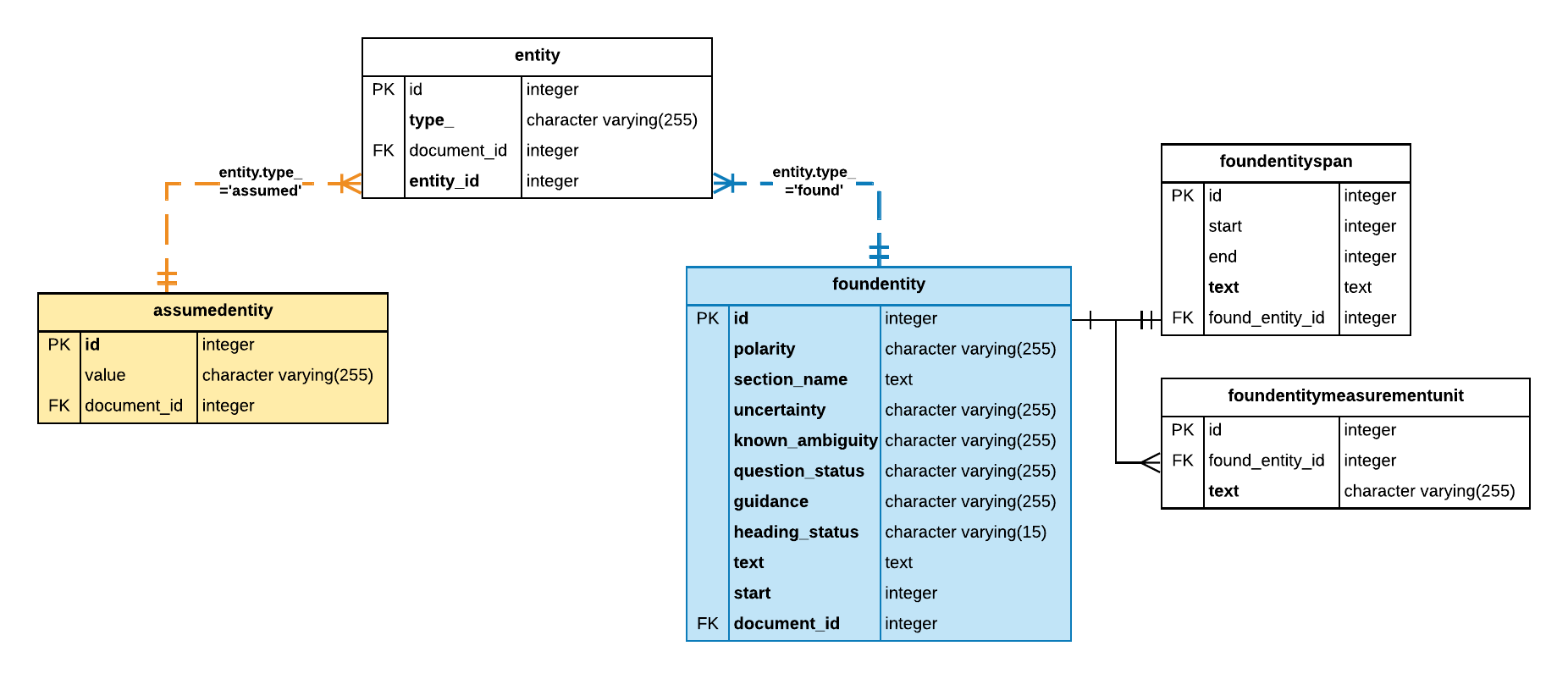
The entity_id column in the entity table references the primary key ID of the foundentity table. Note that this is not set up as an explicit foreign key constraint.
When performing joins between these tables, it is easy to mistakenly JOIN on the primary key of the entity table instead of the entity_id column especially when using auto-complete functionality in some SQL editors. The correct JOIN clause is:
SELECT * FROM entity JOIN foundentity ON entity.entity_id = foundentity.id AND entity.type_='found';
It is also important to note that the additional constraint, entity.type_='found', is required. It is required because entity.entity_id values are NOT unique within the entity table; however, the combination of entity.type_ and entity.entity_id is unique.
Query: Count of entities found in FINDINGS
This query returns the number of entities found in the FINDINGS section that are asserted with no uncertainty using the foundentity table.
This query is not very useful because we only know that the term was positively asserted but we do not know what that term is. The next query shows how to extract the annotated term associated with Entity instances.
Query: Count of distinct terms
This query extracts the annotated term for an entity:
While an improvement on the previous query, the data returned by this query is still not useful for data analysis. This is because many terms can refer to the same concept. Take, for example, diabetes which also commonly appears in medical reports as diabetes mellitus, or abbreviated as DM. It is therefore useful to map related entities to a single semantic representation within a standardized vocabulary. The NLP API supports multiple biomedical ontologies for this purpose. It maps extracted terms (or entities) to concepts identifiers and semantic types from various ontologies. Understanding the database schema relations between entities, concepts and entity types is the subject of the next section.
Concepts and Entity Type Tables
In the NLP API, recognized terms are related to concepts and semantic types in multiple ontologies. A concept corresponds to the standardized representation of a recognized term in a specific ontology. Entity types correspond to the semantic type or classification for a set of related concepts. For example, the various variant forms for diabetes, such as diabetes mellitus and DM are mapped to the concept diabetes mellitus of semantic type disorder in the SNOMED CT ontology. The ontologies that entities are mapped to are specified during data processing as the NLP API commandline parameters.
Each found entity may be associated with one or more concepts and entity types depending on the number of ontologies selected during document processing. For example, in the JSON output for the entity diabetes found in a report processed with the snomed-ontology and radlex-ontology features enabled, the diabetes entity has:
- Two concept ids,
Cradlex1andCsnomed1, in itsconcept_linksattribute - Multiple entity types, one for each ontology selected at processing, and if available for the ontologies selected, one for the UMLS metathesaurus in its
entity_typeattribute.
In the Output Database schema, the relation between found entities, concepts and entity types, is implemented by the following tables:
- foundentityconcept,
- concept, and
- foundentitytype
The following ER diagram shows the relation between these tables.
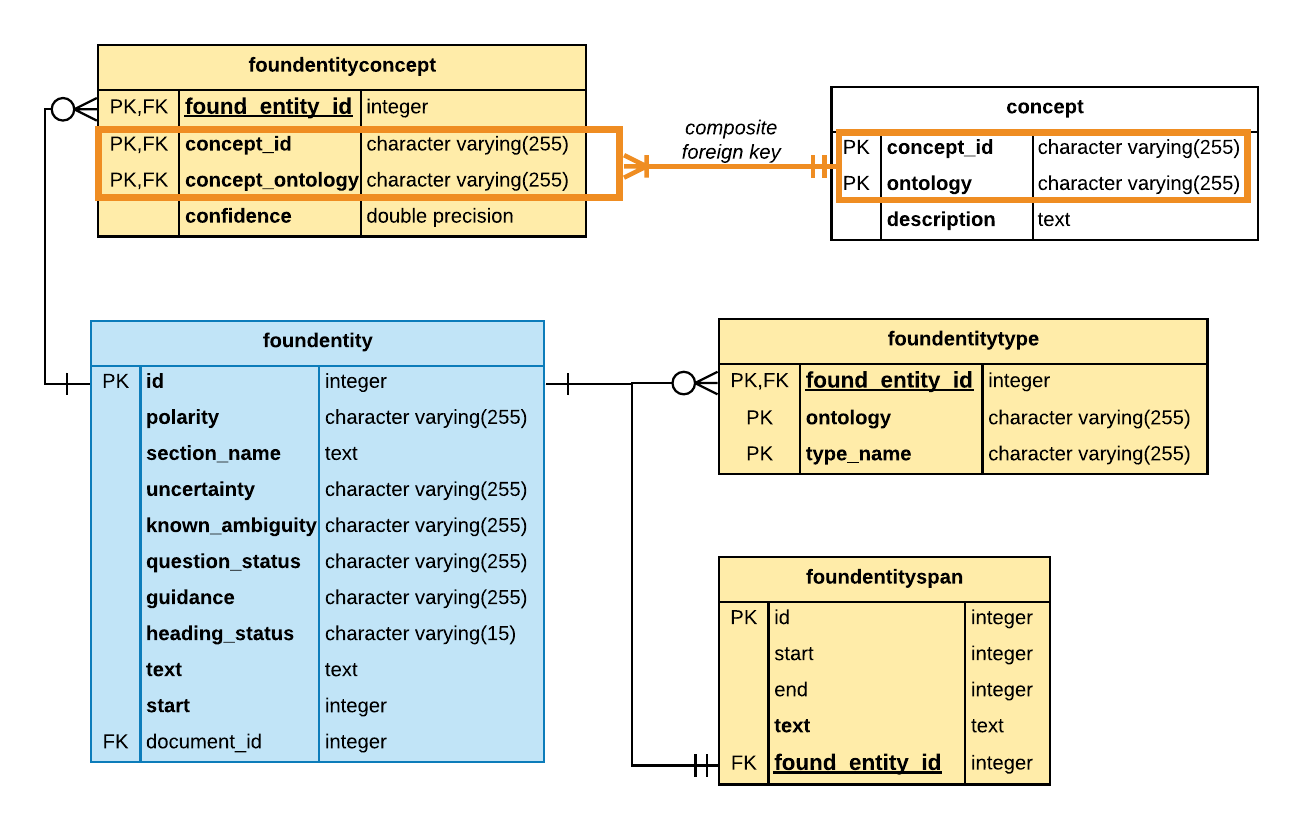
It is important to note the following:
- The foundentity table and the tables whose names begin with foundentity such as foundentityconcept, foundentitytype and foundentityspan, are related using the found_entity_id foreign key reference.
- The foundentityconcept table relates the foundentity to the concept table. The relation between the foundentityconcept table and the concept table is a composite foreign key reference that is composed of the columns that store the concept ID and the ontology data in the respective tables. This is important when performing a join between these tables.
- The foundentitytype table stores the ontology-specific semantic classification of the entity in the type_name column. For example, the SNOMED CT entity type for the term
diabetesthe type_name column contains the semantic type ofdisorderand the ontology column contains the valuesnomed, whereas for RadLex the type_name column containsclinical findingand the ontology column containsradlex. - The foundentityspan table stores the span offsets of the terms associated with a foundentity. For more information see FoundEntitySpan Table.
The ontologies referenced in the foundentitytype table are distinct from the ontologies referenced by the concept table. The former refers to the ontology used for semantic type classification of related concepts, and the later refers to the ontology that defines the standardized concept related to an entity.
Query: Show concept description for entities
This query lists all entity occurrences and attributes for the SNOMED CT concept id for diabetes by joining the following tables:
- foundentity
- concept
The SNOMED CT concept id for diabetes is 73211009. You can look up SNOMED CT concept identifiers using the SNOMED CT Browser.
When performing an inner join on the foundentityconcept and concept, the conditional statement must test for equality on the concept_id and ontology columns as follows: fec.concept_id = c.concept_id AND fec.concept_ontology = c.ontology
Query: Find frequency of SNOMED CT concepts of type ‘disorder’
The following query uses the foundentitytype and foundentityconcept join tables to relate a concept to it’s semantic type for a given ontology. In this example, we have chosen SNOMED CT, and the semantic type of disorder.
Note, you can narrow down the search results to return only disorder concepts that appear in a specific section of a report by adding a logical condition on the section_name column of foundentitytable.
Query: Find section names
This query returns a list of all normalized section names in the database.
Note that NLP API recognizes many more sections than shown above. It also extracts section names for sections and subsections of medical reports. The level of the section can be retrieved from the sectionlocation table. More information is about this is found in the Document-level Tables page.
Additional Resources
Ontology References
Here are some useful links for looking up ontology-specific concept identifiers:
- To look up or browse SNOMED CT concepts: https://browser.ihtsdotools.org
- To browse RadLex concepts: http://www.radlex.org
- To browse some of the UMLS ontologies: https://uts.nlm.nih.gov/metathesaurus.html
Utility SQL Queries
While planning a query, you will often find that you need to understand how annotated terms are mapped to concepts and entity types before selecting a subset to analyze. Below are some data exploration queries that may be helpful.