

Imagelink Relations
In this section, we explain the imagelink relation data model and how it is implemented in the NLP API JSON output and in the Output Database schema. We also provide sample queries to illustrate the aspects of the data schema.
After reading this page, we hope you will:
- Understand what imagelink relations are.
- Know how to retrieve image references and related findings for imagelink relations.
- Know how to find imagelink relations in documents.
The content in this section builds on the concepts and data models explained in earlier sections (see Entity-level Tables, and Document-level Tables).
What are Imagelink Relations?
Imagelink relations are radiology-specific relations. They are found in sentences where the dictating radiologist explicitly mentions the Series and Image where a finding was observed. Imagelink relations is an association between two types of arguments: image findings and references.
Consider the following sentence:
From the above sentence, the NLP API extracts the arguments that comprise an imagelink relation as shown:
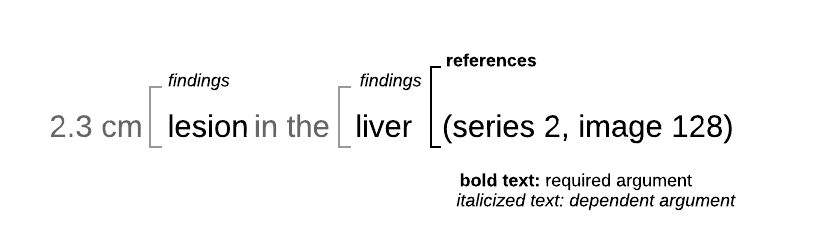
In addition to the example above, the NLP API recognizes many variations in how images can be referenced in reports. The following are examples of image references recognized by the NLP API:
Note, the list above is not exhaustive.
An imagelink relation will typically have only one image reference. However, it can have many image finding entities. When using the SNOMED ontology, findings are entities with semantic type such as body structure, finding, disorder or morphologic abnormality. You may also use other semantic type categorizations provided by other ontologies enabled during processing such as UMLS, MEDCIN and RadLex.
It should be noted that imagelink relations are only extracted from FINDINGS and IMPRESSIONS sections of radiology reports.
JSON Data Model
The JSON below shows the NLP API’s JSON result output for a medication relation extracted from this statement:
From the JSON output above, we see that:
- The
imagelinksarray is an element of therelationsobject. Each element of theimagelinksarray represents an imagelink relation instance. - An imagelink relation instance has two types of named arguments:
referencesandimage_findings. - The
referencesargument is an entity that represents an image reference. - The
image_findingsarguments are entities that relate to an observed finding or structure. - There can be a one-to-many relation between
referencesandimage_findings, but at least one image reference must be present.
ImageLink Relation Tables
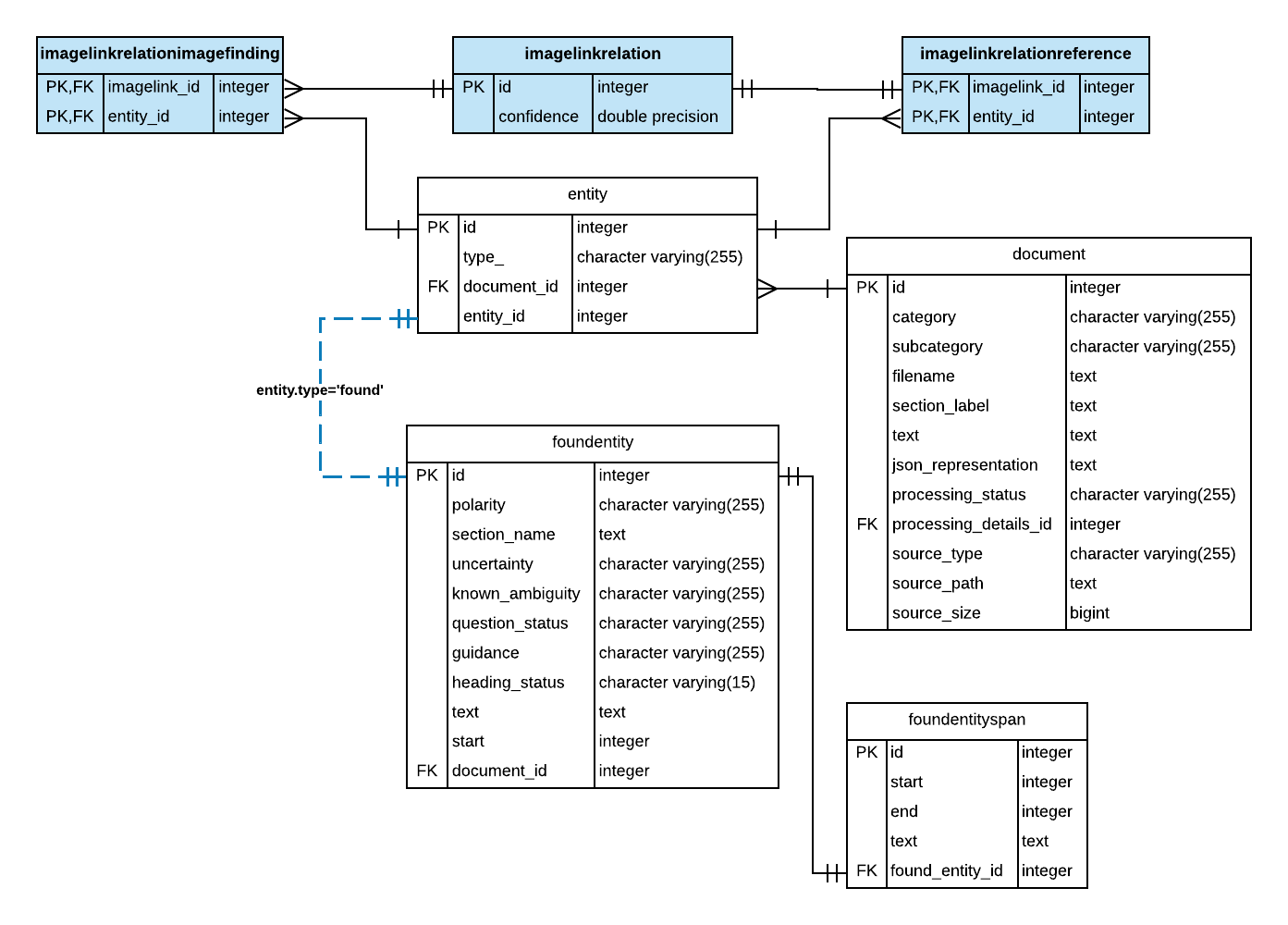
In the Output Database schema, imagelink relations are stored in the imagelinkrelation table. Its arguments are represented by the imagelinkrelationimagefinding and imagelinkrelationreference tables.
The following ER diagram shows the relationship between these tables:
From the ER diagram above, a few key points should be noted:
- The primary key of the imagelinkrelationimagefinding table is a foreign key reference to the imagelinkrelation table’s primary key.
- Similarly, the primary key of the imagelinkrelationreference table is a foreign key reference to the imagelinkrelation table’s primary key.
- The imagelinkrelationimagefinding table entity_id column is a foreign key reference to the entity table. This foreign key constraint implements a one-to-many relation between imagelink relation and finding entities.
- The imagelinkrelationreference table entity_id column is a foreign key reference to the entity table. This foreign key constraint implements a one-to-many relation between imagelink relation and image reference entities.
- The entity table has a foreign key reference to the foundentity table which stores many entity attributes. By joining the foundentity with other entity-related tables, you can retrieve information associated with the concepts, entity types and locations for an entity. See Entity-level Tables.
Note: While the NLP API’s database schema supports a one-to-many relation between imagelink relations and image references, in practice, we can consider the relation between imagelink relations and image references to be one-to-one.
Sample Queries
In this section, we provide sample SQL queries that illustrate how to retrieve data for imagelink relations. SQL queries will be discussed in order as follows:
- Query: Retrieve the annotated text for image references and findings
- Query: Count of image references by finding concept
- Query: The average number of image references per Radiology CT report
- Query: Retrieve sentences containing imagelinks
Note: Because imagelink relations are specific to Radiology reports, please use an Output Database that contains output from processing Radiology reports.
Query: Retrieve the annotated text for image references and findings
This query finds image references related to umbilical hernia: a partial or full collapse of the lung. It retrieves the terms that NLP API identified as the image reference, and the finding of umbilical hernia.
To find information about imagelink relations we start at the imagelinkrelation table and perform a series of joins. The query involves the following steps:
- First, construct an intermediate table containing the image term and a comma-delimited list of finding terms for all imagelink relations, using a CTE, as follows:
- Get the finding terms by performing an inner join between the imagelinkrelation and imagelinkrelationimagefinding tables to get the entity_id. Then, perform a series of inner joins with entity-related tables to retrieve the text column from the foundentity table.
- Get the image terms by performing an inner join between the imagelinkrelation and imagelinkrelationreference tables to get the entity_id. Again, perform the same series of inner joins to retrieve the annotated text from the foundentity table.
- Use the
string_aggWindow function to aggregate the finding terms associated with a specific image reference into a comma-delimited list by partitioning on the imagelinkrelation table primary key.
- In the outer query, use a WHERE clause to filter for the string
umbilical herniain the comma-delimited list of findings.
Query: Count of image references by finding concept
This query finds the frequencies of image references grouped by findings. Since each imagelink relation is one image reference, we can count imagelink relations to get the number of image references. Then, instead of grouping by finding terms, we will group the imagelink relations by the finding’s SNOMED CT concept.
This query involves the following steps:
- First, start with imagelinkrelation table and perform the series of table joins to retrieve the SNOMED CT concept from the concept table.
- Then, perform a count distinct on the imagelink relation ID to count the number of imagelink relations for each concept, grouping by concept ID and description.
Note, the DISTINCT keyword is required because it is unlikely, but possible, for an imagelink relation to have multiple findings with the same concept ID.
Query: The average number of image references per Radiology CT report
This query counts the imagelink occurrences by document in a CTE, and then gets the average number of imagelink occurrences across all documents in the database.
Query: Retrieve sentences containing imagelinks
This query shows how to use the location, document and sentencelocation tables to retrieve sentences containing imagelink relations from documents. The query involves the following steps:
- Starting with the imagelinkrelation table, perform a series of JOINs as shown in the SQL code below.
- Note that when joining the foundentitylocation with the location table, in addition to joining on the foreign key fields, we need to check that the location type is
sentenceand notsectionas in the SQL code below. - Then, in the SELECT statement, use the text column from the sentencelocation table to retrieve the sentence containing each imagelink relation.
For a more complete explanation of how to work with the location, sentencelocation, and document tables see Document-level Tables.