

Choose an NLP API Client
emtelligent provides NLP API clients for many different environments, but not all clients have the same functionality, and we recognize that sorting out which client you should use can be difficult. This document attempts to make this process easier by describing the clients available in one place, via different use case scenarios, and by multiple dimensions.
The clients discussed in this document are:
- NLP API Visual Client
- NLP API Python Client/SDK
- NLP API Java Client/SDK
Suggestion: The most full-featured and actively developed client for non-programmatic GUI access is the NLP API Visual Client, and the most full-featured and actively developed client for programmatic command-line access is the NLP API Python Client/SDK.
If customers wish to use write their own SDK or client using any language outside of the SDKs/Clients included in this document, please contact emtelligent for access to an authentication test server; getting the NLP API’s HMAC-based authentication working is usually the most difficult part of connectivity with the NLP API. The auth-test server provides rich debugging information not available on the production NLP API server (for obvious security reasons) to greatly simplify the custom client creation process.
NLP API Visual Client
The NLP API Visual Client is a web-based client, available at visualclient.emtelligent.com. When customers are set up with an NLP API account, they are given a username and password to log into this site.
The NLP API Visual Client allows a user to submit either text blocks, or PDF files, and choose which processing options to use via a simple, web-based user interface. It returns a visualization of annotations from the NLP API, as well as the NLP API’s raw JSON output.
The NLP API Visual Client is useful for one-at-a-time processing of reports, sentences, or report sections, to visualize what the engine is outputting in a graphical view. It is not intended for database connectivity, or for programmatic access, and requires no technical skill to use. Their only hardware/software requirement is an Internet connection and a relatively recent web browser that can deal with the JavaScript and SVG files this client uses.
NLP API Python Client/SDK
The Python Client/SDK package contains a command-line client written in Python as well as Python modules that users can use to write their own clients. This client have no graphical user interface. The client included in this package is called emtellipro-db-client.
Requirements and installation instructions are in the Python SDK docs: Python SDK Installation and Requirements.
emtellipro-db-client
This is a full featured client for the NLP API written in Python. It can be used to send documents to the NLP API engine and save the result in various formats. It can save the raw JSON received from the NLP API engine or transform the JSON into internal Python classes and create a database schema in any number of popular database systems (e.g. MySQL, PostgreSQL, Microsoft SQL Server, sqlite, etc.). This client automatically performs an ETL step to load the NLP API output into this schema. It can be used in the following modes:
- Input of files from disk, with ETL of the NLP API output into a database
- Input of text fields from a database, with ETL of the NLP API output into a database
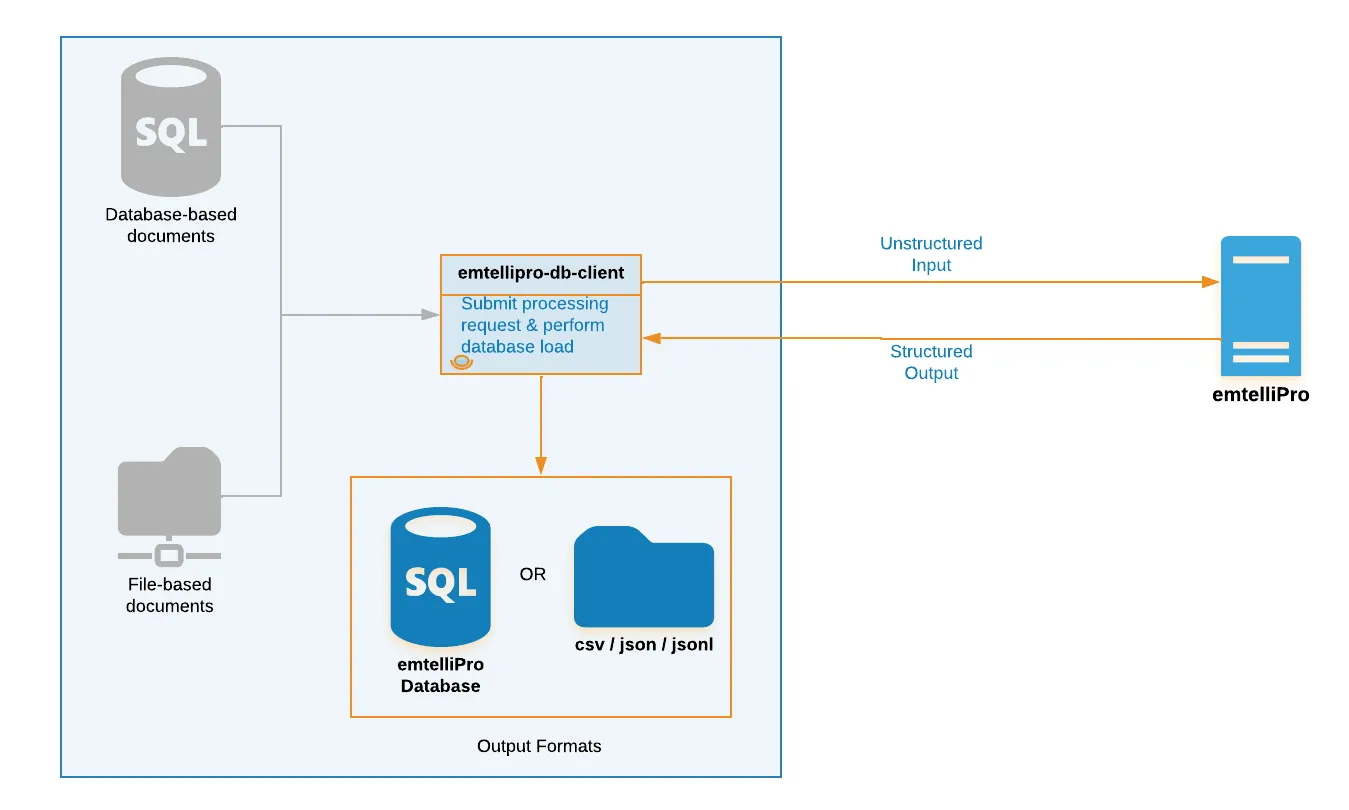
This client uses the popular Python library SQLAlchemy as an ORM for connectivity to multiple database systems, however depending on the RDBMS used for connectivity, additional libraries/modules may need to be installed (e.g. PyODBC, FreeTDS, Microsoft SQL Server drivers, etc).
This client also supports the option to store document metadata (such as patient ID, institution name, document description) in a documentmetadata table which allows the single NLP API output schema to be used to deploy rich applications.
Further documentation on the Python Client/SDK is available here.
NLP API Java Client/SDK
For customers using Java, the NLP API Java Client/SDK is available. It comes with a complete set of Java libraries and Javadocs for users wishing to implement their own Java-based NLP API client, and also includes a very basic example client that supports file-based I/O with the NLP API, similar to the Python emtellipro-client above.
The Java SDK also includes libraries for parsing the NLP API output for database applications.
Further documentation on the Java Client/SDK is available here.