

Simple Query App Tutorial
Medical NLP doesn’t exist just for itself - you use NLP software on unstructured medical text for a reason - e.g. to know how many of your patients have cancer, or to be able to ask your phone if Mrs. Smith has any allergies, or to have better search tools in your EMR. And because there are so many different uses of NLP, everyone is going to do the integration a little differently. But that’s ok - the basics are that you need to:
- Take some unstructured medical text (e.g. a clinic note from a doctor’s office visit)
- Process the medical text using an NLP engine
- Take the output from the engine and put it into some kind of a data store
- Deploy some kind of an application using this data.
This guide is to walk you through some of the basics of the steps above to show you how you can do this. We’re going to pretend that we have an EMR that we want to add a ‘smart search’ feature for medical imaging reports to - we’re going to make our EMR a search page where a doctor can search for a disease term and whether it’s present or absent or not.
In this example, our EMR back-end uses MariaDB in which it has a bunch of patient records stored as text. Now for a production environment, you’re going to want to deploy things a little differently than we do here - but what we’re doing here is showing you all of the steps in a way that illustrates how to build this ‘smart search’ application using the NLP API.
Step 1: Get our Reports Ready
Here, we’re going to just use a simple example which will work well with the Advanced Client from the Python SDK - we’re going to just process a simple text report. We’re going to use the sample_ct_report.txt file included with the Python SDK, and there’s not much else to do so let’s move on to Step 2.
Step 2: Create the Output Tables in our Database
This part is a bit more complicated. Here, we’re going to start off by adding some new tables to our emtellipro_example database into which we can store the structured data that we’ve extracted from the processing run. The data that NLP API will output is stored in the API specification, but a short list of what we need to store is:
-
Identified entities (e.g. “acute appendicitis”)
-
Ontology information about those entities:
- The ontology name
- Concept IDs
- Semantic type information - e.g. “symptom” or “disease”
-
Assertions about those entities:
- Polarity (did the report author say that the entity was present or absent)
- Uncertainty (did the reprort author indicate that uncertainty about an entity was present, e.g. “possible appendicitis”)
-
Relationships those entities have, such as:
- The experiencer of the entity, e.g. “The patient’s mother had a hip fracture”
-
Positional information about where the entity was found in the original report, including the sentence position and absolute positon of the text itself.
-
Other useful information, such as:
- The original report_id where the entity was found
- The sentence in which the entity was found
In keeping with good database normalization rules, we need to create several new tables and relations between these tables to properly store this information. The tables that we’re going to create are:
- The
entitytable, which will store:- A unique identifier for the entity
- Whether the entity was found (via an implicit mention) or assumed
- A foreign key to the document identifier from which the entity originated
- The
concepttable that will store:- The fully-specified name of the concept
- The original ontology concept_id
- The ontology name from which the concept was identified
- The
documenttable that will store both a pointer to the original document and the original document itself, along with a unique id for the document. - A series of tables about found and assumed entities that describes:
- The start and end spans of the entity in the original document
- The concept ID and the ontology from which the concept originated
- Features about the entity such as the semantic type, polarity, uncertainty, and the section of the report that the entity was identified in
- The sentence in which the entity was identified in
- Tables for information on relations in the document such as the
relationandexperiencerrelationtables that describe relations contained in the document. - Tables for information about the sentences in the report such as the
sentencelocationspantable that describes the start and end position of all the sentences in the document.
Set up your username and password for your database as environment variables:
In order to create these database tables, we’re going to use the Python SDK’s advanced client (emtellipro-db-client) which can build the database tables we’ll need for storing the NLP API output in a properly normalized fashion:
Step 3: Processing and Storage
Here, we’re going to take the example CT scan report provided with the Python SDK, and we’re going to process it with the NLP API, then store it in the tables that we created in Step 2.:
We recommend that you store the public and private keys in a file for use later. In this example, we ask you to store the key files in your home directory (in practice, they can be stored anywhere).
Store your the API keys as follows:
- Create a file named
access.akin your home directory. - In
access.ak, add a line containing only the public key. - Create a file named
secret.akin your home directory. - In
secret.ak, Add a line containing only the private key.
We’re going to use the advanced client (emtellipro-db-client) from the Python SDK to process our JSON file of reports:
If this all works correctly, we should see a message showing us that the processing run completed and the output data was inserted into the new tables in our database that we created in Step 2.
Step 4: Application Deployment
For the final step, we’re going to create and deploy a PHP application that is going to allow a user to find any SNOMED concepts from our processed report that:
- Contain a part of a SNOMED term
- Allow the user to select whether the concept is asserted or negated
- Allow the user to determine if there is uncertainty used in describing this concept
We’re going to make some assumptions here as well:
- The user has a LAMP stack up and running on their server (we’re going to use our
emtellipro_exampleMariaDB database as the ‘M’ in LAMP here) - The webserver root is in
/var/www/html - apache2 as well as PHP and its proper MySQL extensions must be installed and working properly.
First of all, let’s create an HTML form that will allow our user to search for a SNOMED concept ID:
This is going to create a form that looks like this:
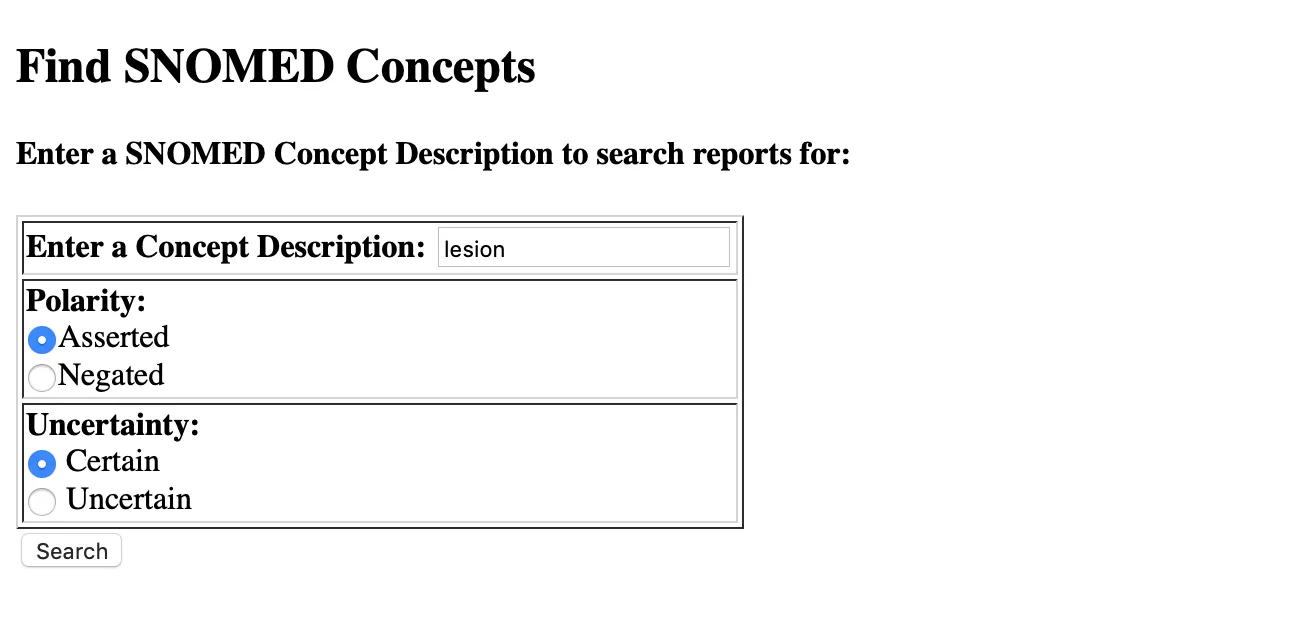
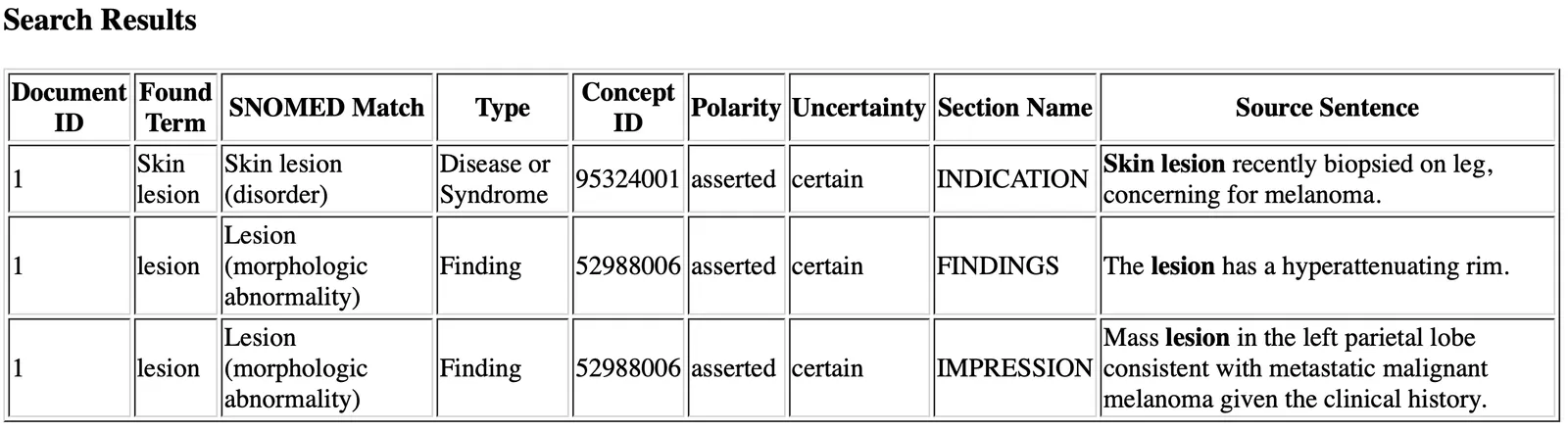
Our next step is to create the PHP script that will search the database for any reports that contain the SNOMED concept that the user has searched for with the polarity and uncertainty assertions that the user has chosen (present/absent and certain/uncertain):
Assuming we have found a report in our output table that contains the concept and assertions we’re looking for, this will output a table that looks like:
Summary
And that’s pretty much it - you’ve created your first application using the NLP API! Just to recap, we:
- Exported some raw reports from our EMR database as JSON (useful for the Java SDK)
- Added some new tables to our database to store structured medical data
- Processed these reports with the NLP API and stored the results in our new tables
- Created a web-based application to search for SNOMED concepts in our reports with assertions about those concepts