

Follow-up Relations
In this section, we explain how structured data for medications relations is represented in the NLP API JSON output and in the Output Database schema. We also provide sample queries to illustrate the key aspects of the data schema.
After reading this page, we hope you will:
- Understand what follow-up relations are.
- Know how to retrieve data for follow-up relations.
For an example of building on this data, see also the Simple Query App Tutorial, which walks through a simple web-based search application over the NLP output stored in this database.
The content in this section builds on the concepts and data models explained in earlier sections (see Entity-level Tables, and Document-level Tables).
What are Follow-up Relations?
Follow-up recommendations are commonly found in diagnostic reports such as Radiology, Pathology and Cardiology reports. For example, the NLP API will extract them from sentences in radiology reports where the dictating radiologist indicates that a follow-up study should be performed. The radiologist will typically provide some or all of the following information in a follow-up recommendation:
- Reason: the pathology identified that should be followed up e.g. a lung nodule.
- Procedure: the type of diagnostic procedure that should be performed for further evaluation.
- Time expression: when the follow-up procedure should be performed.
The NLP API extracts these as arguments of a follow-up relation.
Consider this follow-up recommendation:
From the above sentence, the NLP API extracts the arguments comprising the follow-up relation as illustrated below:

Note, at least one of the three types of arguments must be provided for a follow-up relation to be extracted.
JSON Data Model
Consider the following sentence:
The JSON output for the follow-up relation extracted from this sentence is shown below:
Notice the following:
- The
followupsarray is an element of therelationsobject. Each element of thefollowupsarray is a single object representing a follow-up relation. - A follow-up relation instance has three types of named arguments:
reasons,proceduresandtime_expression. - The
reasonsargument is an array of entity references to the reasons for the follow-up recommendation. Note that multiple reasons may be associated with one follow-up relation. - Likewise, the
proceduresargument is an array of references to entities about procedures related to the follow-up. Like reasons for follow-ups, multiple procedures may be found in one follow-up relation. - The
time_expressionargument is a reference to an entity that indicates the timeline for the follow-up. Note that only one time_expression entity is extracted per follow-up relation. - Follow-up relations have a
polarityattribute. The value of the polarity can benegatedorasserted. Thenegatedfollow-up relation is extracted when the radiologist explicitly indicates that no follow-up is necessary.
Follow-up Relation Tables
In the Output Database schema, the follow-up relations data model is implemented in the followuprelation table, and its related tables: followuprelationreason and followuprelationprocedure.
The following ER diagram shows the relationship between these tables:
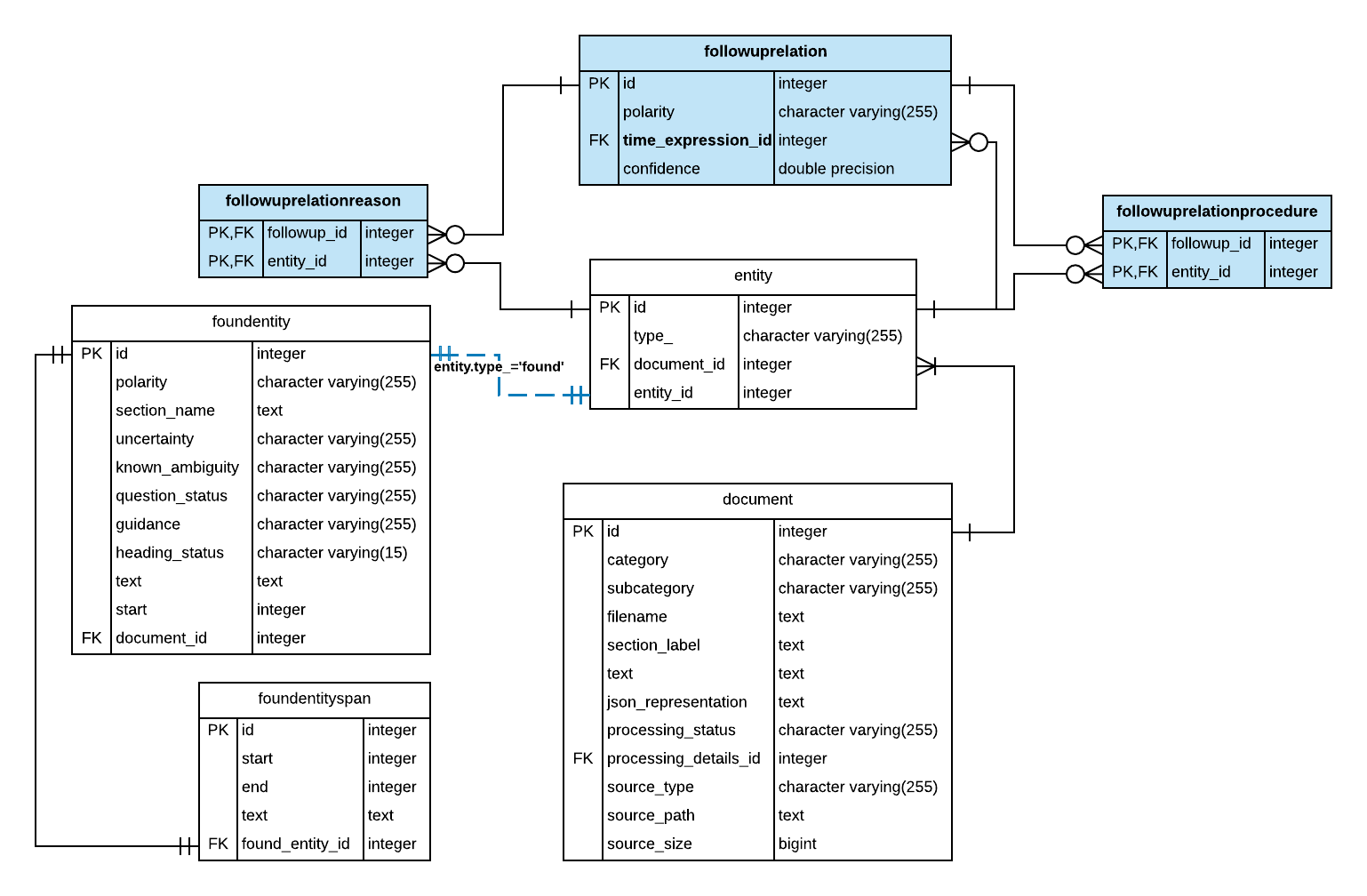
From the ER diagram above, observe that:
-
The followuprelation table stores the polarity attribute, and the entity_id of the time_expression argument.
-
The time_expression_id column of the followuprelation table is a foreign key reference to the entity table, or null. From the entity table you can perform a series of inner joins to access the entity information from entity-related tables, see Entity-level Tables.
-
The followup_id columns of the followuprelationreason and the followuprelationprocedure tables contain foreign key references to the followuprelation table. Hence,
- to get the reason for a follow-up relation, perform an inner join on the primary key of the followuprelation and the followup_id of the followuprelationreason table.
- to get the procedure for a follow-up relation, perform an inner join on the primary key of the followuprelation and the followup_id of the followuprelationprocedure table.
-
To retrieve information about the follow-up relation arguments such as the reason or procedure, you must perform an inner join on the corresponding entity_id keys with the entity associated entity-related tables, see Entity-level Tables.
It’s important to note the cardinality of the relations. A follow-up relation can be associated with:
- one or more procedures entities
- zero or more reasons entities
- zero or one time_expression entity
When querying follow-up relations, it is important to note that unlike other relations, there are no independent or required arguments. The reasons, procedures or time_expression for follow-up relations may be null. This has particular significance when you are performing left joins on these tables.
Sample Queries
In this section, we present queries to illustrate how to write SQL queries to retrieve information about qualifier relations. The SQL queries will be discussed in order as follows:
- Query: Display terms for arguments in follow-up relations
- Query: Frequency of reasons for follow-up recommendations
- Query: Frequency of follow-up imaging recommendations
Note: Because follow-up relations are specific to Radiology reports, please use an Output Database that contains output from processing Radiology reports.
Query: Display terms for arguments in follow-up relations
This query retrieves the annotated terms follow-up relation arguments. This query illustrates the cardinality of the relation between a follow-up relation and its arguments.
The query involves the following steps:
- Using a CTE, create a temporary named result set,
reason_terms, which contains follow-up relation ID, and the annotated text for follow-up reasons. This involves the following:- Joining the followuprelation table with the followuprelationreason table using followup_id foreign key reference. Then perform a series of inner joins with entity and foundentity tables. The annotated term is found in the foundentity table.
- Aggregating the annotated terms using a Window function to compute a comma-delimited list. At this point there will be duplicate rows for each
followuprelation.id- one for each reason associated with a follow-up relation instance. Later, these duplicate rows will be removed in the GROUP BY clause in the enclosing query.
- As in step one, create a temporary named result set,
procedure_termswhich contains the follow-up relation ID, and the annotated text for follow-up procedures. - Then, create a temporary named result set,
time_expressionwhich contains follow-up relation ID and the annotated text for the follow-up time expression. - In the enclosing SQL query, use a subquery to create a named result set,
ids, which contains the follow-up relation primary key ID. Then, perform a series of left joins on the ID field of theidsresult set and thereason_terms,procedure_termsandtime_expressionresult sets. The left join on theids.followup_relation.idensures that all follow-up relations are present in the final results, whether or not any individual argument isnull.
Query: Frequency of reasons for follow-up recommendations
This query is useful as a preliminary exploration of the reasons given for follow-ups. Instead of analyzing the annotated terms which have many linguistic variants, we analyze the reasons using standardized concepts and their semantic type classification.
Because we are interested in the reasons for follow-ups, we start by querying the followuprelationreason table. Then, we can retrieve the concepts and entity type for every follow-up reason entity by performing an inner join with the entity table, and related tables such as foundentityconcept and foundentitytype tables. Note that NLP API supports multiple ontologies for concept and semantic type classification purposes. In this query, we use the UMLS metathesaurus for semantic type classification, and SNOMED CT for concept classification of the annotated terms.
Query: Frequency of follow-up imaging recommendations
This query retrieves the count of follow-up recommendations by imaging modality. Because this query is about the procedure associated with follow-up relations, we start with the followuprelationprocedure table. By performing a series of inner joins with entity-related tables, we get the concept and entity type for procedure entities from the concept and foundentitytype tables respectively. Note, for this query, we used the RadLex ontology as a concept and semantic type classification system; And, we constrain the resultset to only those follow-ups where the procedure is of semantic type imaging modality.