

API Key HMAC Authentication
This is the documentation for the NLP API authentication scheme using API keys and SHA256 HMAC signing. It is closely based on AWS4 authentication (see below).
Credentials
For authentication the user must have an access key and a shared secret which are also known to the server. Both are sequences of printable ASCII characters where leading and trailing whitespace is insignificant.
Both the access key and shared secret should be kept secret. The access key is not a username or public key.
In older versions of this document, and in AWS4 authentication, the shared secret was referred to as “secret access key”.
Summary
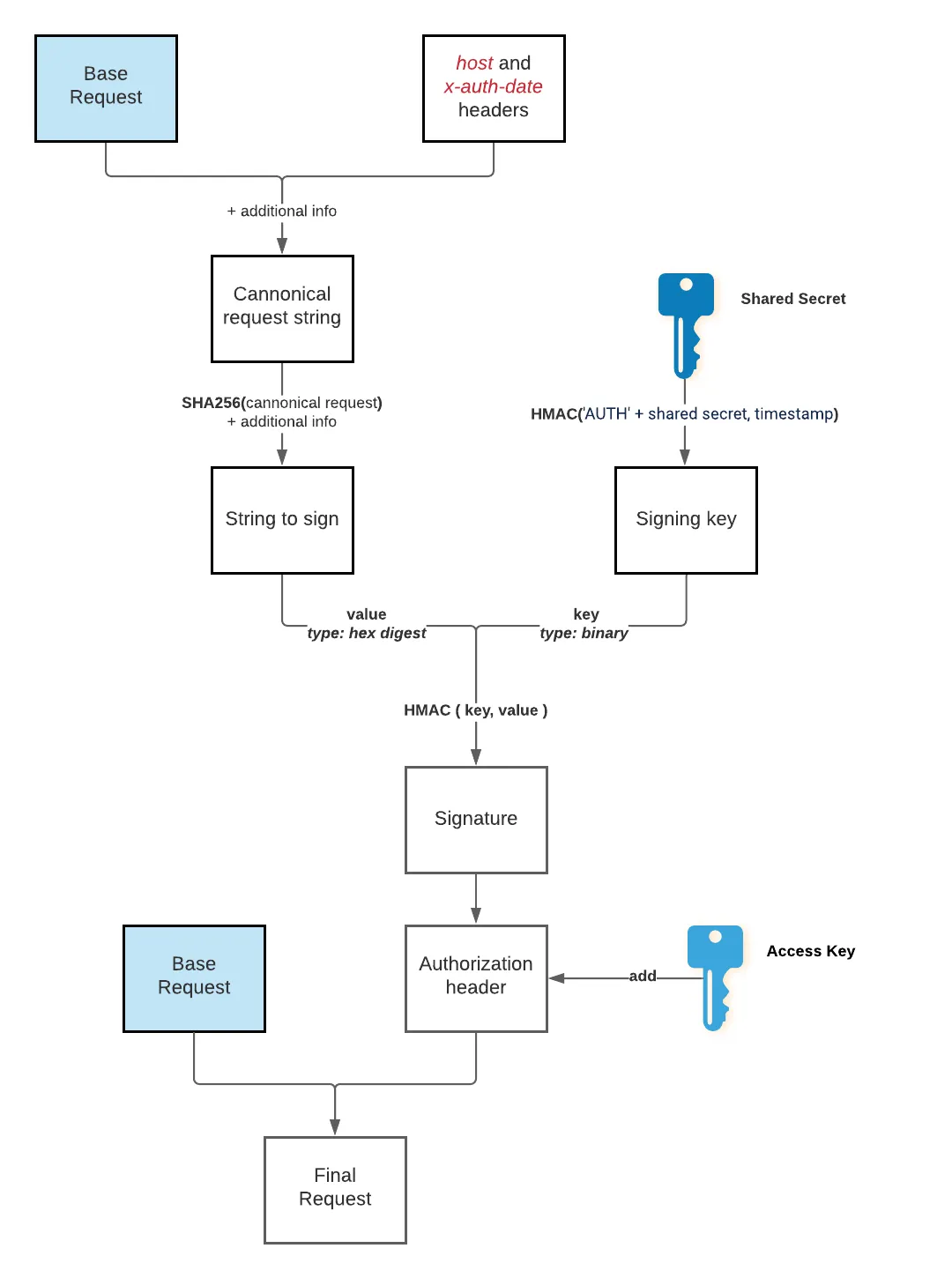
The outline of the authentication algorithm is as follows:
- The required host and date headers are added to the request.
- A canonical request is created, a string which represents the request in a normalized form.
- The canonical request and some additional information is used to create a string to sign.
- The shared secret is used to derive a signing key.
- The string to sign is signed using the signing key to derive the signature.
- The signature is added to the request.
The server contacted can verify the authentication by recreating the canonical request and then repeating the steps to its signature. The server will check for a valid hostname in the Host header and a time stamp in the X-Auth-Date header close to the time when it receives the request as a security measure to preempt replay attacks.
The following diagram summarizes the key steps for deriving and adding a valid authentication header to a message request:
Details
This is the complete details for authenticating an HTTP request.
Input
- The access key and shared secret.
- An HTTP request to be authenticated.
- A UTC time representing the time the request is made.
- A set of headers by name to be included in the signature.
Running example:
- Access key is
1f838e6de96f1520d84f142a56a81134bba6bd4d626e752b8733dc87fb02604dand shared secret is3c6b788bf73c155fa5ef480cc99653fd696a9e599cbba677aa878e1037cf7284. - The HTTP request is:
- Method:
GET - URL:
https://nlp.emtelligent.com/emtellipro/user - Headers:
Accept:application/json
- Payload is empty
- Method:
- The UTC time is 2017-12-25 03:15:10.
- The headers to include in the signature are only the required headers
HostandX-Auth-Date(which will be added below).
Signing headers guarantees that they cannot be modified before reaching the server. Therefore, only sign authentication related headers (i.e. the two required ones) and any headers that include sensitive data. Especially, do not sign headers (e.g. Connection) that can be modified by proxies.
Required headers
The following headers must be added to the request before the authentication process and must be included in signing:
Host, with the value being the hostname of the server being contacted.X-Auth-Date, with the value being the UTC time in ISO 8601 basic format (strftimeformat%Y%m%dT%H%M%SZ).
In the example, two headers are added to the request:
Host:nlp.emtelligent.comX-Auth-Date:20171225T031510Z
Canonical request
Create a canonical request string by joining the following separated by newlines:
- The HTTP method as an all-caps string, ie GET, POST, etc..
- The path part of the URL, normalized according to RFC 3986 and with redundant and relative path components removed, and URL-encoded. If the path is empty, then use
/. If the path is not empty, include a final/if and only if the input URL had one. - The query part of the URL (after the
?), normalized as follows:- Sort all parameter names by character code point in ascending order.
- If there are parameters with duplicate names, then sort on values by character code point in ascending order.
- URL-encode parameter names and values, without changing RFC 3986 reserved characters (A-Z, a-z, 0-9, hyphen, underscore, period, tilde), and percent-encoding all other characters that need encoding (including space, rather than using plus).
- Use a standard query string with
&and=separation, but not including the?. - If no query part of the URL is present (e.g. for the
user,status, andcancelfunctions), then a newline is required here.
- A canonical header list for the headers to sign produced as follows, separated with newlines:
- Normalize names of the headers to sign to lowercase and remove leading and trailing spaces.
- Normalize sequential spaces in header values to single spaces.
- Sort the normalized header names by character code point in ascending order.
- For each header to sign, use the normalized header name followed by a colon followed by a comma-separated list of values for that header (in their original order).
- An extra newline.
- A list of headers to sign produced as follows, separated by semicolons:
- Normalize all names of headers to include in signing to lowercase.
- Sort the header names by character code point in ascending order.
- The SHA256 hash of the HTTP payload, as a lowercase hex digest. If the payload is empty, hash the empty string.
Note that the header list has one header on each line and is followed by the extra new line, while each other item in the canonical request is on a single line. There is no newline at the end of the whole canonical request string.
For implementation, also note that although the canonical string needs the URL and headers in normalized forms, when generating requests programmatically you will likely be producing URLs and header values in straightforward forms that require little or no explicit normalization. For example, when generating URLs you may only need to be careful to avoid double forward slashes.
In the example, the payload is empty and hashes to e3b0c44298fc1c149afbf4c8996fb92427ae41e4649b934ca495991b7852b855. We get the following canonical request string:
Note that the first blank line is the query part of the URL (which is empty in the example), and the second is the extra newline after the canonical header list.
String to sign
Create a string to sign by joining the following separated by newlines:
- The name of the hash algorithm, “SHA256”.
- The UTC time in ISO 8601 basic format (
strftimeformat%Y%m%dT%H%M%SZ). - The UTC time in
strftimeformat%Y%m%d(this duplicated date is for compatibility with AWS4, see below for details). - The SHA256 hash of the canonical request string, as a lowercase hex digest.
Note that there is no final newline character.
In the example, the string to sign is:
Signing key
Derive the signing key as follows:
- Prepend
AUTHto the shared secret with leading and trailing whitespace removed. - Get the UTC time in
strftimeformat%Y%m%d. - Take an SHA256 HMAC as a binary value (not hex digest), using (1) as a key and (2) as a value. This is the signing key.
In implementing the HMAC steps (deriving the signing key and producing the signature), make sure of the details of the HMAC function implementation you are using:
- HMAC takes a key argument and a data value argument and is not commutative; make sure that you have the correct arguments.
- Make sure to use binary result (not the hex digest string) values for HMAC input and output where required.
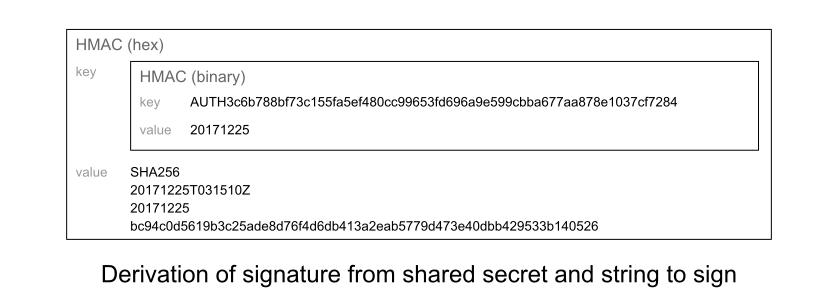
In the example, the signing key will be HMAC("AUTH3c6b788bf73c155fa5ef480cc99653fd696a9e599cbba677aa878e1037cf7284", "20171225"), where HMAC represents SHA256 HMAC with the first argument being the key and the second being the value, and returning a binary value. Its hexadecimal representation is:
Signature
Get a signature for the request by taking an SHA256 HMAC as a hex digest, using the signing key (still a binary value) as a key and the string to sign as a value.
In the example, the signature is:
Adding authentication information
To add authentication information to a request, use an Authorization header. The header should have the name Authorization, and its value should have the following form:
Where:
{access key}is the access key with leading and trailing whitespace removed.{short date}is the UTC time instrftimeformat%Y%m%d.{signed headers}is the list of headers to sign, lowercased, sorted by character point in ascending order, and separated by semicolons.{signature}is the signature for the request.
Note that since the Authorization header includes the signature, it is not itself included in the headers to sign.
In the example, the Authorization header value is:
Other examples
The AWS documentation includes examples of deriving a signing key in various languages (with the additional complication of credential scopes).
Differences versus AWS4 authentication
This authentication scheme is based on AWS4 authentication. However,
- We use the term “shared secret” instead of “secret access key”.
- We use empty credential scope, so that only the
%Y%m%ddate is used where AWS4 would use the date prepended to credential scope. - We use SHA256, and the hash algorithm name for headers etc. is “SHA256”.
- The prefix to the shared secret when deriving the signing key is “AUTH”.
- We use headers
HostandX-Auth-Datefor the host and date respectively. - We currently only support using an Authorization header (whereas AWS also supports sending authentication information as query parameters).