

C-CDA Section Mapping
The NLP API Python SDK client attempts to normalize section headings based on XML section information. The normalization of section headings is essential for aggregation and analysis of information from disparate sources. This section provides some background information and explains how headings in C-CDA based documents are normalized. It explains these key points:
- The C-CDA standard defines section templates which contain necessary metadata to uniquely identify document sections.
- The NLP API client first tries to normalize section headings using the templateId OID (object identifier) provided for the section in the C-CDA XML markup.
- If normalization from OID was not possible, it then tries to normalize section headings using any LOINC codes provided in the C-CDA XML markup.
- If neither of the above normalizations succeeded, the client has other methods to create a section heading.
A mapping table of C-CDA Section template OID to the normalized section names is provided for reference, see Normalization using template OID).
Background
The HL7 Consolidated Clinical Document Architecture (C-CDA) standard provides a clear specification for the structure of clinical note documents of which there are many types, one of which is the Continuity of Care Document (CCD). Examples of other common clinical note document types are: Progress Notes, Referral Notes, and Discharge Summaries. The C-CDA implementation guide defines templates that specify the conformance requirements for each type of clinical note and their contents. The template structure of a C-CDA clinical note has 3 levels (document, section and entry levels), as shown in the image below:
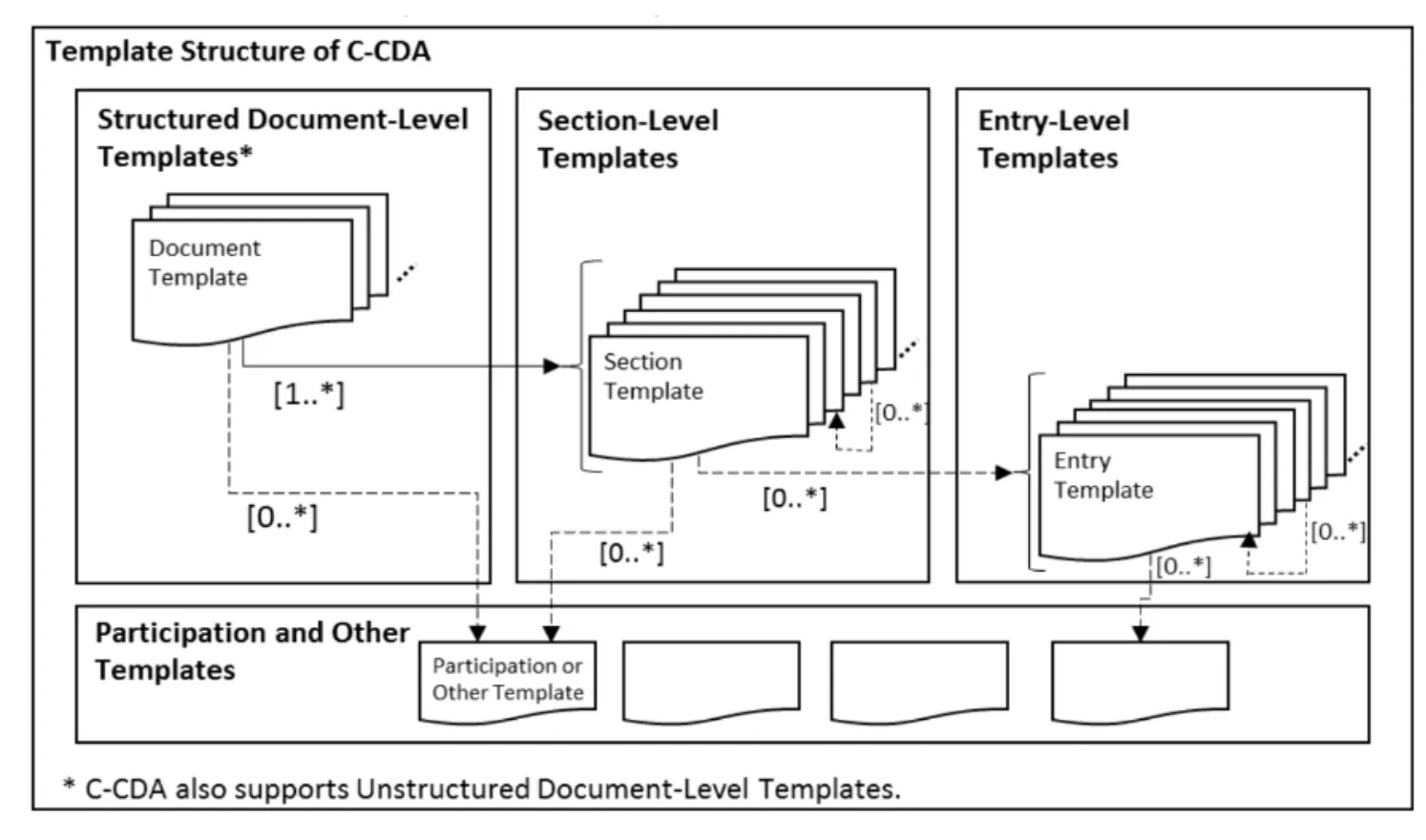
Figure 1. (source: Template structure of C-CDA. HL7 CDA(R) R2 Implementation Guide: C-CDA Templates for Clinical Notes STU Companion Guide Release 3 (US Realm), May 2022 )
Each Section Template in a C-CDA document contains two copies of its data; the first copy is in XML-encoded HTML, and the second copy is encoded in “machine-processable” XML form. When the client reads a C-CDA document, it converts the XML-encoded HTML into text form, and sends it to the NLP API for processing. It also converts the “machine-processable” XML portion of the C-CDA document into JSON metadata, but does not send it for processing. Upon receipt of the NLP API’s output, the NLP API output will be stored in an NLP API database, normalized into a number of tables, and the JSON corresponding to the machine-processable XML portion of the C-CDA document will be stored as a key/value store in the documentstructuredmetadata table. For more information about how coded entries are extracted see Structured entries as metadata.
As noted above, section templates contain information in human-readable form (the XML-encoded HTML portion of the section template). Each section template represents a type of section; some examples of these are: Encounters, History of Present Illness, Assessment sections, and many others as defined by the C-CDA Implementation Guide. Section templates are globally-defined and may be found in more than one type of clinical note. For example, the Immunization section is found as a required or optional section in CCDs, Consultation Notes, and Discharge Summaries. Critically, the NLP API utilizes the metadata found in the section-level templates to identify a C-CDA defined section and map them to standardized section names as described in the next section.
Section normalization for C-CDA documents
Section templates specify the format of section metadata, namely that XML markup for section templates must provide a templateId OID identifier (i.e. an object identifier that is a globally unique ISO identifier) and some C-CDA documents (it appears to be vendor/version dependent) also include LOINC code.
An example of this is:
In this example, the OID 2.16.840.1.113883.10.20.22.2.3.1 indicates that this is a the RESULTS SECTION, and this is concordant with LOINC code 30954-2, which has a long name of Relevant diagnostic tests/laboratory data Narrative. Similar to the templateId OID, the required LOINC code for a section indicates what the type of information that the section contains. For example, the PROBLEM SECTION has the LOINC code of 11450-4 (Problem List). A full list of section templates can be found in the HL7 CDA<sup>(R)</sup> Release 2 Implementation Guide: C-CDA Templates for Clinical Notes STU Companion Guide Release 3 (US Realm) Standard for Trial Use May 2022. It should be noted that the client recognizes all the section template OID identifiers in this version of the implementation guide and others that we have encountered in our testing.
Normalization using template OID
The NLP API client uses the section template’s OID as key criteria for section normalization. The table below shows the mapping of template OIDs to NLP API section names. For convenience, the LOINC code that the C-CDA standard assigns to each template OID is also listed, although in Emtelligent’s experience, there can be variability in template OID to LOINC code mappings. This may be useful for remapping NLP API section names to LOINC codes for systems which use LOINC coding as the preferred coding system for sections.
If there are multiple applicable OIDs for a section, the client uses the shortest (more general) code.
Mapping of OIDs to headings for the NLP API.
Note, that OIDs have 2 parts - a root and version indicator. For backward compatibility, an NLP API section name can map to multiple OIDs.
This mapping was generated using the C-CDA R2 Implementation Guide Release 3 (May 2022). As of the date of writing, this is the version currently designated as ‘Standard for Trial Use’ (STU). This maturity designation indicates that the version “has been well reviewed and is considered by the authors to be ready for use in production systems.” It may not be exhaustive relative to subsequently released erratas or versions.
If you encounter a template OID in your data set not in the above list, please contact Emtelligent. Note, however, that even though the missing OID is not recognized by the NLP API, its section contents will still be extracted and processed by the NLP API. The section below explains this case - where either no template OID is found, or an unrecognized OID is encountered.
Normalization using LOINC codes
If the NLP API client is not able to normalize a section from template OID, then it attempts to normalize based on any LOINC codes found in the XML for the section. The table below shows the mapping of LOINC codes to NLP API section names.
In the case that a section has at least one LOINC code but no LOINC code for it is in the mapping, the client uses a default code of 85847-2 (NOTES SECTION).
Mapping of LOINC codes to headings for the NLP API.
Headings when no normalization was possible
As the C-CDA standard is continuously evolving, it is possible to encounter older C-CDA documents which do not specify a template OID for each document section, or those that specify a template OID that is pre-standard or unknown to the client. In the case where the client cannot do normalization from template OID or LOINC, it will give the section the heading that is specified in the <title> tags in the XML-encoded HTML portion of the document. The NLP API may then normalize this section heading.
Subsections
C-CDA document sections may contain multiple subsections. These are usually delimited in the XML-encoded HTML with <caption> tags. An example of this would be in Allscripts C-CDA documents, where the Functional Status Section of the CCD has a Functional Status Health Issues subsection and a Cognitive Status Health Issues subsection. In these cases, the client will add the sub-section titles from these <caption> tags with the suffix SUBSECTION:. These subsections will then be identified by the NLP API as Level 1 sections.
Sections in Embedded Documents
C-CDA documents may contain embedded documents such as surgical or diagnostic reports, that the document creation workflow has pasted in as relevant results. These documents often contain their own section headings - for example, a radiology report pasted into a CCD in this manner may contain an INDICATION section and an IMPRESSIONS section. When the NLP API detects sections of this type inside of CCD documents, they will be detected as Level 1 or higher (i.e. Level 2 or Level 3) section headings to prevent conflict with the C-CDA specified Level 0 section headings.
When exploring the structured output returned by the NLP API, we recommend that you get a list of all section names returned by the NLP API for the clinical notes of interest, before filtering by the selected section names. There may be more than one section name that should be used to query for the data you want. For example, to return data about patient’s social histories, you may need to filter for section names like SOCIAL HISTORY SECTION (the OID mapped section name) and SOCIAL HISTORY (the section name assigned when OID is not give) to retrieve the complete set of results. For documentation on how to search the NLP API Database please refer to the NLP API Output Database documentation, Entity-level Tables section.