

Introduction
CCDs are used to summarize the most relevant facts about a patient’s healthcare, covering one or multiple encounters. They provide a means for one provider to aggregate data about the patient and forward it to another provider to support continuity of care within the system. The primary use case is to provide a snapshot in time containing the relevant clinical, demographic and administrative data for a specific patient. CCD document standard is one of the document types in the consolidated CDA document architecture. CDA (Clinical Document Architecture) is a widely-adopted application of HL7 v3 Reference Information Model (RIM). The CDA standard defines a universal XML schema for defining many clinical document templates. It forms the basis for many standards-based information systems.
Overview of the CCD Document Structure
The CCD (Continuity of Care Documents) document standard was developed as a joint effort of HL7 and ASTM. It maps the functionality of the ASTM Continuity of Care Record (CCR) into the HL7 v3 CDA format. CCDs are sometimes also referred to as CEDs (Clinical Exchange Documents). CCDs typically contain these sections:
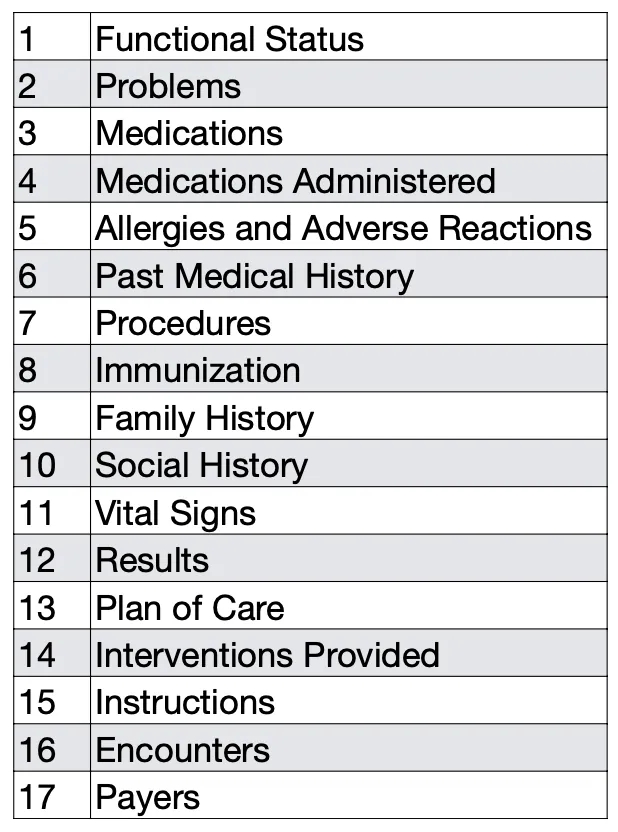
The CDA standard specifies templates for documents, sections and entries. A document template specifies a set of required and optional section templates, and section templates specify the format of the content for presentation and the entry templates that the section may contain.
A C-CDA section has 2 major parts:
- HTML content - These are narrative blocks intended to contain information for human interpretation and for rendering to human-readable form. These are authored as HTML content which may include unstructured narrative text (in the form of paragraphs, lists containing comments or whole embedded reports). This content may also be provide semi-structured data in the form of HTML tables.
- CDA entries or coded entries - These are blocks enclosed by the
entryXML element tag. These machine-readable blocks contain information intended for automated processing.
The following is an excerpt of a CCD document showing the HTML content in the Past Medical History section. This information is rendered as follows:

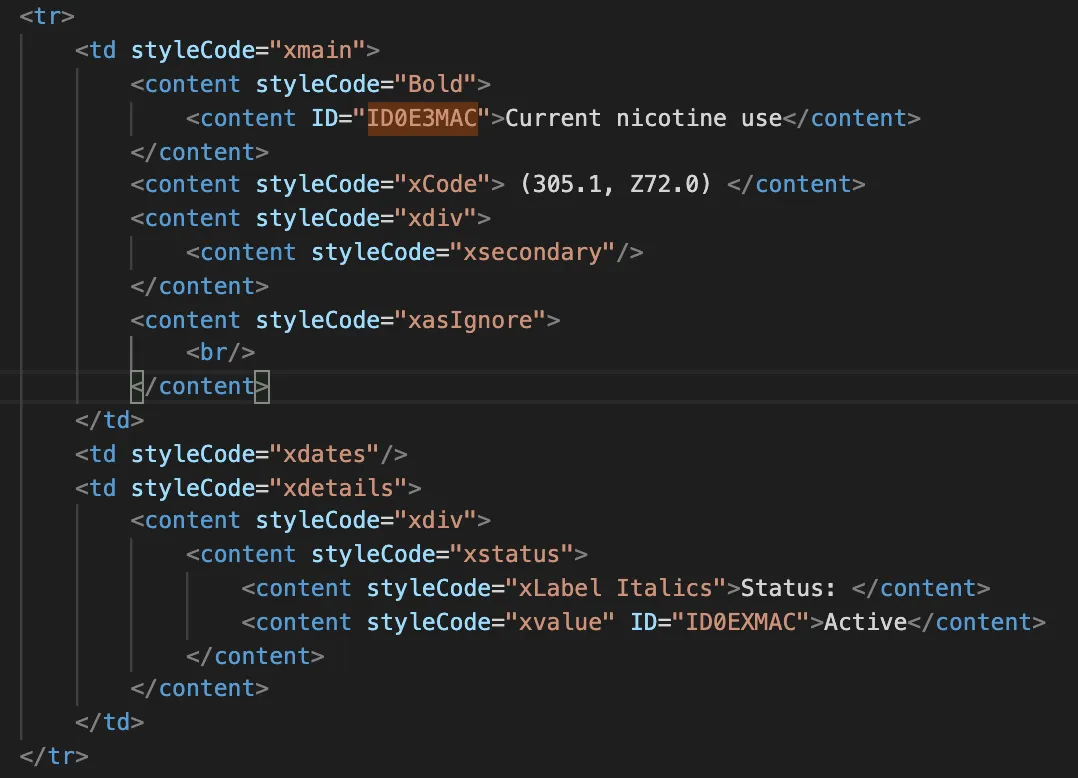
This shows the corresponding HTML markup for the row containing Current nicotine user. Notice that the content element has an ID and that the information is presented in tabular form:
NLP API performs Entity Extraction from Text Content
The NLP API extracts entities from the human-readable text content of the CCD document. The entities extracted are stored in the foundentities table. Each row in this table represents an entity extracted from the text content of the document.
Text ID references such as the one shown above ID="ID0E3MAC" are used to link coded entries to the human-readable text content. The structured data is contained in the coded-entries, which are XML elements that contain coded information.
NLP API retains but does not process CDA entries
The following is an example of a CDA or coded-entry in a CCD document:
Note that coded entries encode information using multiple coding systems, and have a type or class code. The above entry encodes information about an Observation.
They may also encode relationships between related coded entries. For example a problem observation, has a coded element (e.g. Current nicotine use), and a coded status. Other relationships exist between coded entries, for example between a vaccine drug mention and a vaccine administration event. These relationships can be challenging to navigate and are not the primary focus of medical language extraction systems like the NLP API. However, NLP API client does comprehensively retain a many types of information from the XML coded parts of a CCD document:
- Document-level context: record target (patient information), document tye identifiers, and associated datetime values
- Section-level context: LOINC section code, identifiers and display names
- Coded information: code value, code translations, coding system used, as well as effective times and values (e.g. reference ranges, physical quantities, status etc )
- Entry relationships
Moreover, the NLP API preserves the association with the the human-readable text (via a Text-ID reference)
NLP API CCD Support
For this project, our main objective was to extract coded clinical terms and values from body sections (and not administrative information, demographic and other information also present in the CCD headers). We extracted medical terms from the human-readable sections such as the Functional Status, Problems, Past Medical History, and from structured data (or coded-entries).
You can submit CDA documents (as XML files) to the NLP API for processing using the NLP API Python SDK and client. If you have specific data ingestion requirements, please contact support. Due to variability of CCD documents, some customization may be required.
In addition to performing NLP on the text data of CCDs, the NLP API Client extracts, transforms and stores the pre-structured/coded XML entries as JSON objects. This information is uploaded to the documentstructuredmetadata table in the Output Database. Using JSON query capabilities in PostgreSQL and Snowflake you can retrieve useful information from this data. Several sample queries are provided in this section. Note, however that this is an advanced use case, and you are encouraged to contact us for support and guidance as needed at support@emtelligent.com.
Documentstructuredmetadata table
The structured XML data present in CCD is extracted and stored in the documentstructuredmetadata table. Each row in this table represents an instance of a coded value. The table has 4 columns:
- id - unique identifier for the entry
- document_id - a foreign key that references document(id)
- key - a static string value set to
structured_data - value - JSON object representing one coded entry
The following is an example of a JSON object stored in the value column:
Note that in addition to storing information from standard CDA template elements such effective time, code, code_system_name, status_code etc., the NLP API has added additional JSON key-value pairs needed to provide context for the coded element. The observation XML element refers to the HTML-formatted text element via the text_id field.
A coded-entry is to a Section via the section field. This field provides the label of the section entry for the code-entry. Hence, you can retrieve coded-entries by section if desired.
Any child elements contained in an observation element (for example its coded values, and statuses) are extracted as separate JSON objects that are linked together using ID references: the parent_references in the child object refers to the label field in its parent’s JSON object. Likewise the section field links the observation and its child objects to the coded sections, thus preserving context about the extracted coded data.
The following queries show how to get the JSON data for coded entries from the documentstructuredmetadata table using database-specific JSON operators and functions:
- Query: Retrieve Coded-Entries JSON for one CCD document
- Query: Find SNOMED CT coded concepts and their text spans
Query: Retrieve Coded-Entries JSON for a CCD document
SQL
Query: Find SNOMED CT coded concepts and their text spans
PostgreSQL
Snowflake
Processing Requirements
This query assumes that at least the following emtellipro-db-client processing options were enabled:
--store-sections-and-sentences
For this query, Continuity of Care Documents were processed with the following document type:
--category Clinical--subcategory CCD
Ensure that you have installed the NLP API CCD reader plugin v1.6 or later.
Next steps
Because emtellipro extracts data from narrative blocks as well as the XML coded-entries, you have the option of querying data from the text elements (as the NLP API entities) or the coded-entries (in JSON objects).
Sample query for entities extracted for text elements: The Smoking status query
Sample JSON queries for retrieving coded data:
- Find CCD Document-level Metadata
- Find Entities Extracted from Embedded Reports
- Find Problems with Statuses in Coded Entries
- Find Hypertension using Hierarchical Concept Search in Coded Entries
- Find Vaccines & Dates of Administration
- Find coded Physical Quantities in CCDs
Sample query that utilizies both coded data and entities from text elements: